BdThemes Elementor Plugins Backdoored via Poisoned API — Check Your Site Now
A sophisticated supply chain attack disclosed August 7, 2026 by Wordfence Threat Intelligence has put every WordPress site running BdThemes plugins on high alert. The attack is notable for what it didn't do: it never touched the plugin source code in the WordPress.org repository. Instead, attackers poisoned a remote promotional API feed the plugins fetched on every admin page load — and used a buried XSS flaw to run their payload without the plugin vendor ever shipping malicious code.
Seven Plugins, One Compromised API Feed
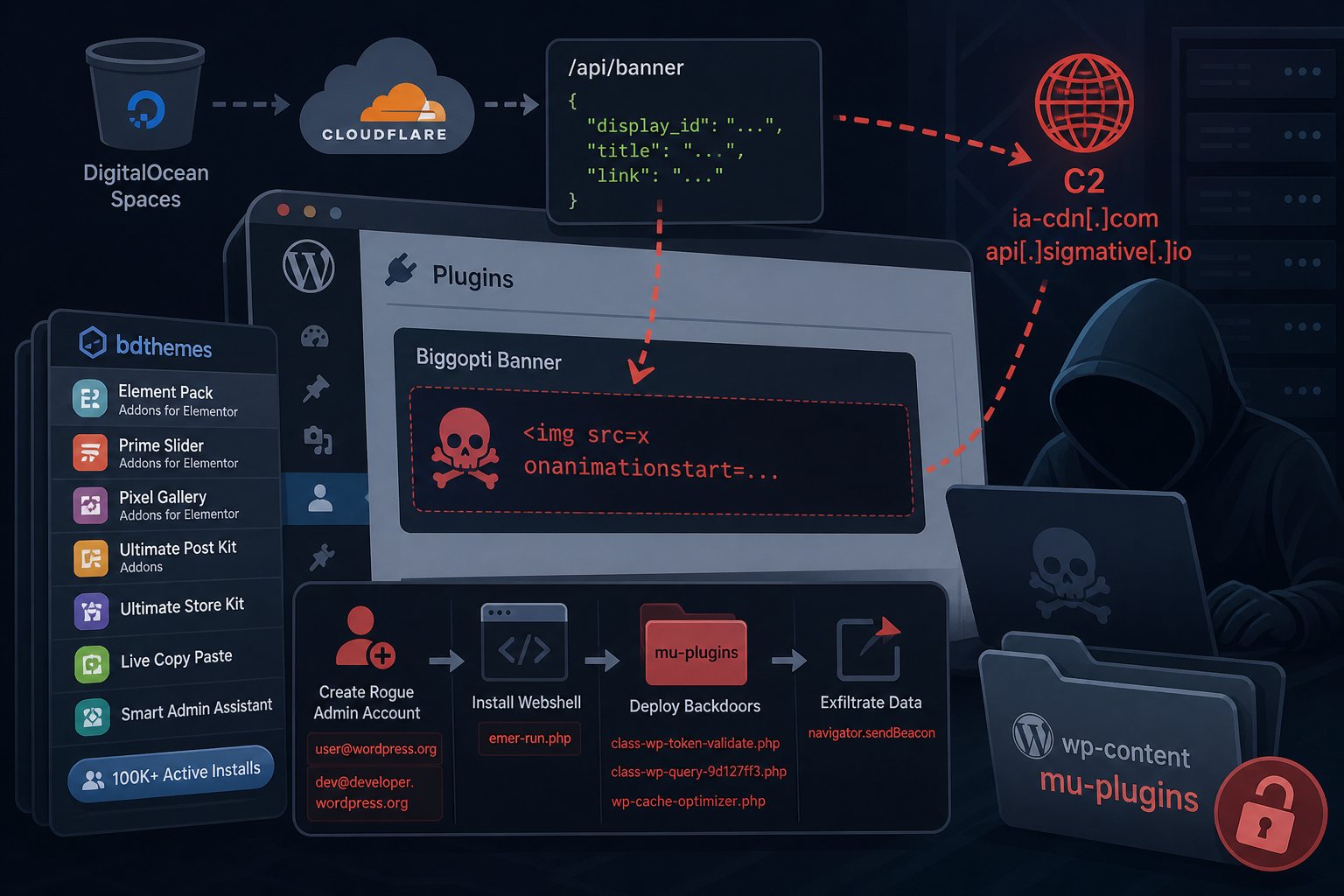
The affected plugins all share a promotional banner component called Biggopti, which fetches display data from an external API endpoint hosted on a DigitalOcean Spaces bucket, fronted by Cloudflare. Legitimate HTTPS, legitimate-looking domain, no red flags on the surface. The plugins affected are:
- Element Pack Addons for Elementor (100,000+ active installs, 4M+ total downloads)
- Prime Slider Addons for Elementor
- Pixel Gallery Addons for Elementor
- Ultimate Post Kit Addons
- Ultimate Store Kit
- Live Copy Paste
- Smart Admin Assistant
The XSS vulnerability — introduced in Prime Slider v4.1.9 on March 1, 2026 — stemmed from a display_id parameter being injected into HTML attributes without proper escaping. A partial fix landed May 10 when the API endpoint changed and a sanitizer was added, but the id attribute itself remained unescaped. That gap was all the attackers needed. The earliest signs of malicious campaign activity in the poisoned API responses date to June 23, 2026 — meaning sites may have been quietly backdoored for about six weeks before discovery.
What the Payload Actually Did
Once attackers replaced the legitimate JSON in the DigitalOcean bucket with their crafted payload, any WordPress admin who loaded their dashboard with an affected BdThemes plugin active triggered the attack chain silently. The primary payload, w2.js served from ia-cdn[.]com/fz/, used an onanimationstart event handler — a technique designed to fire without user interaction and leave minimal trace in browser logs.
The attack sequence from that point:
- Contact the C2 server at
ia-cdn[.]com/fz/cfor targeting instructions - Create a rogue WordPress administrator account via the REST API, using email addresses that mimic
@wordpress.orgor@developer.wordpress.orgto blend in with system accounts - Download and silently install a fake plugin containing the
emer-run.phpwebshell - Deploy two Must-Use (mu-plugins) backdoors for persistence — MU plugins load automatically and don't appear in the standard plugin management screen
- Exfiltrate results back to the C2 via
navigator.sendBeacon
A secondary payload, x.js, took a different angle: it generated deterministic credentials by hashing the target hostname, creating predictable usernames in the format bd_[6 alphanumeric characters] and passwords following the pattern Bd@26![hash]x. That means attackers could return to any compromised site and log in without needing the C2 at all.
How to Tell If Your Site Was Hit
The API endpoints were cleaned on August 8, and all seven plugins were temporarily closed on WordPress.org pending investigation. But cleaning the supply side doesn't clean sites that were already compromised during the window. Check for these indicators immediately:
- Suspicious admin accounts: look for usernames matching
bd_followed by six alphanumeric characters, or any administrator account with an email at@wordpress.orgor@developer.wordpress.org - Webshell file:
emer-run.php(MD5:1024732009983dd5e54b4cf5593f04d4) anywhere in your plugin or uploads directories - Backdoor files in your
wp-content/mu-plugins/directory:class-wp-token-validate.php,class-wp-query-9d127ff3.php, orwp-cache-optimizer.php - Database options: the presence of
fz_emer_login_tokensorfz_emer_done_v1in yourwp_optionstable - Network indicators: any outbound connections to
ia-cdn[.]comorapi[.]sigmative[.]ioin your server access logs
Wordfence Premium, Care, and Response customers received malware signatures and WAF rules on August 7. Free tier users are on the standard 30-day delay — meaning if you're running a free Wordfence install, automated detection is not yet active for you. Run a manual scan against the indicators above regardless of your Wordfence tier.
Why This Attack Is Harder to Catch Than Most
The typical WordPress supply chain compromise — like the ARVE plugin backdoor disclosed earlier this month — poisons the plugin code itself, meaning file integrity checks and repository audits can flag it. This attack took a different path: the plugin files in the WordPress.org repository were never modified. The malicious code arrived at runtime, fetched from a third-party API over a legitimate TLS connection. File checksums pass clean. WordPress.org verification passes clean. The attack lives entirely in a remote data stream the plugin pulls on every admin page load.
That's the lesson here that goes beyond BdThemes: any plugin that fetches remote content and renders it in the admin panel has essentially the same attack surface, whether or not the plugin code itself is ever compromised. The security perimeter of a WordPress site extends to every external endpoint its plugins contact.
What to Do Right Now
If you're running any of the affected BdThemes plugins, treat your site as potentially compromised and work through this checklist:
- Go to Users → All Users, filter by Administrator role, and audit every account. Remove any you don't recognize — pay special attention to
bd_*usernames and wordpress.org email addresses - Check
wp-content/mu-plugins/for any files you didn't install. MU plugins are invisible in the Plugins dashboard; you have to look at the directory directly - Search your full WordPress install for
emer-run.php - Run
SELECT option_name FROM wp_options WHERE option_name LIKE 'fz_%'against your database to check for compromise flags - If you find any indicators, treat it as a full compromise: rotate all credentials (WordPress admin passwords, database password, hosting control panel, SFTP), restore from a clean backup taken before June 23 if possible, and investigate what data the webshell may have accessed
- Defer reinstalling BdThemes plugins until WordPress.org reopens them following their investigation
This is why restores get drilled. A clean backup from before June 23 is the fastest path back to a known-good state — but only if you have one, and only if you've verified it's actually restorable. At Falcon Internet, that kind of regular, tested backup cadence is standard across every managed hosting environment we run.