WordPress 7.0.4 Fixes CVE-2026-65640: When an Image Upload Becomes a Shell
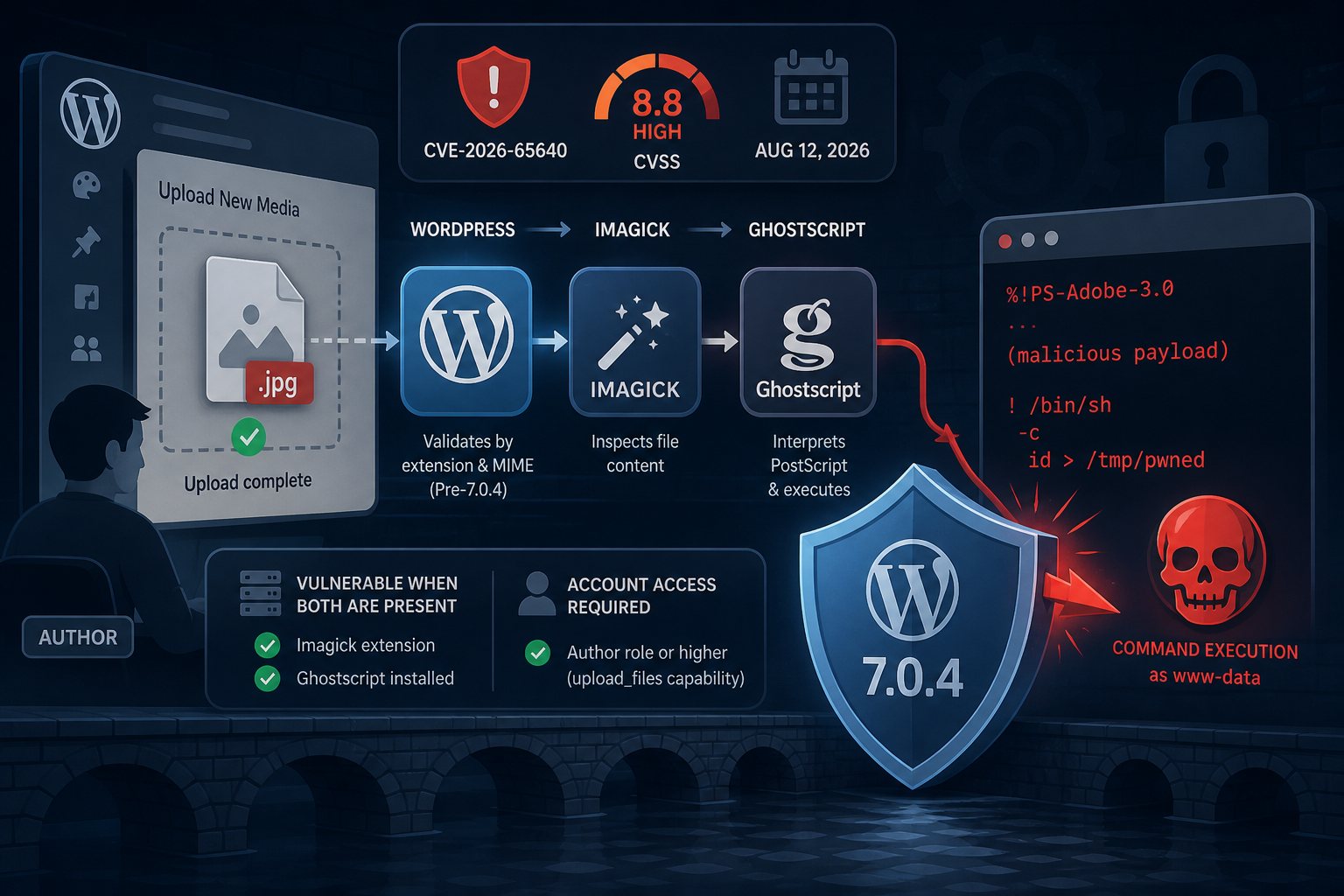
WordPress 7.0.4 shipped on August 12, 2026 — a security-only release addressing a single flaw: CVE-2026-65640, scored CVSS 8.8 High and tracked as GHSA-8vr3-7mxf-gx8w. The vulnerability was responsibly disclosed by researchers at pwn.ai. If your site has not yet updated and your server runs both Imagick and Ghostscript, you should treat this as urgent.
The Attack in Plain Terms
The flaw lives at the intersection of three software components that never agreed on what a "file type" means: WordPress, ImageMagick, and Ghostscript.
Before 7.0.4, WordPress's image editor code path — specifically WP_Image_Editor_Imagick::load() — validated uploaded files based largely on extension and MIME type, then handed them directly to ImageMagick for processing. ImageMagick is smarter than that: it inspects actual file contents to determine format. When it encounters PostScript, EPS, or PDF content, it does not process those itself — it delegates to Ghostscript, an external interpreter with a decades-long history of unsafe embedded-command handling.
The attack path is straightforward once you understand the chain: an attacker with an Author-level WordPress account crafts a file that carries PostScript content under an innocuous image extension. WordPress's upload validation passes it. Imagick reads the actual bytes, recognizes PostScript, hands off to Ghostscript, and Ghostscript executes whatever the PostScript embedding instructs — including OS commands running as the PHP worker process. No additional user interaction is needed after the upload.
The official CVSS vector — AV:N/AC:L/PR:L/UI:N/S:U/C:H/I:H/A:H — tells the story concisely: reachable over the network, low complexity, low privilege required, no interaction, full confidentiality/integrity/availability impact.
Who Is Actually at Risk
This is where the nuance matters, and where some coverage has been imprecise. Two conditions must both be true for a site to be exploitable:
- Server stack: The server must have both the Imagick PHP extension and Ghostscript installed and accessible to ImageMagick. Many stacks use the GD library instead of Imagick. Many that do run Imagick don't have Ghostscript alongside it — it's an optional dependency for PostScript/PDF rendering, not always included in typical server setups. You can verify immediately in WordPress admin under Tools → Site Health → Info → Media Handling; look for a Ghostscript version string.
- Account access: The attacker needs a valid WordPress account with
upload_filescapability — that's Author role or higher by default. If untrusted users cannot create accounts with Author access, your attack surface is limited to compromised credentials or insider threats.
If your server runs GD, or runs Imagick without Ghostscript, you are not vulnerable to this specific exploit path. That said, you should still update: backporting the fix costs nothing, and stack configurations change over time.
Sites at elevated risk: multi-author publications, membership communities, freelancer portfolio platforms, guest-blog networks, or any site where Author accounts belong to people you don't fully control. In those environments, the prerequisite account access is a given, and the only gating factor is server configuration.
How the Fix Works
WordPress 7.0.4 fundamentally changes how the image editor validates files before Imagick ever sees them. Instead of trusting extensions, the patched load() method now reads the first 1,445 bytes of every file and applies its own content-type check before creating an Imagick object. PostScript and EPS content is rejected by both magic bytes and extension. PDF files must carry the %PDF- signature. The code also iteratively strips FORMAT: prefixes — a technique attackers have used to smuggle format hints past single-pass filters.
The patch was backported across 24 release branches, all the way to 4.7.0 — covering essentially every version released in the past nine years. Update targets:
- WordPress 7.0.x → 7.0.4
- WordPress 6.9.x → 6.9.7
- WordPress 6.8.x → 6.8.8
- Older supported branches → apply the equivalent minor update
- Versions 4.6 and below → no patch; upgrade is required
No public proof-of-concept exploit has been released and no in-the-wild exploitation has been confirmed as of August 13, 2026. That window will close — the technical root cause is now documented publicly.
What to Do Now
The update path is the same as any WordPress maintenance cycle, but here is where to focus your attention specifically for this CVE:
- Update immediately. In Dashboard → Updates, confirm you are running 7.0.4 or the appropriate backport for your branch. Run
wp core versionfrom the command line if you manage sites at scale. - Check your media handler. Go to Tools → Site Health → Info → Media Handling. If you see a Ghostscript version listed and you have Author-level users you don't fully trust, this is your highest-priority site to patch.
- Audit upload-capable accounts. Who holds Author, Editor, or Administrator roles? Trim any stale accounts. Enforce strong passwords or SSO on the rest. An attacker who cannot get an account cannot upload the payload.
- Staging and dev environments too. They often run with the same stack as production but update less frequently. A compromised dev environment is frequently the path to production.
- If you cannot patch immediately: You can restrict PostScript/EPS/PDF handling by adding a
denyentry for the PS coder in ImageMagick'spolicy.xml— but note this disables thumbnail generation for PDFs. Switching the WordPress image editor to GD via a filter hook is another option. Both are temporary workarounds; patch as soon as possible.
The Broader Pattern
CVE-2026-65640 is the third WordPress core security release in five weeks, and the second to involve code execution. That cadence is worth noting, but it's not a sign that WordPress is uniquely broken — it reflects the sheer complexity of a software stack that has to process arbitrary media from untrusted sources, across thousands of server configurations, for 40% of the web.
The real lesson here is the same one that surfaces whenever a parser or media processor becomes an attack vector: content-type validation based on extension is not validation. ImageMagick's willingness to sniff actual bytes and route to Ghostscript is a feature — it works correctly for legitimate files — but combining it with a validator that trusts the filename creates a gap any attacker can walk through. The 7.0.4 fix closes that gap by pushing WordPress's own content inspection in front of Imagick's.
At Falcon Internet, this is precisely the kind of flaw that illustrates why patching schedules and monitoring matter on a week-to-week basis, not a quarterly one. Patch times are measured in hours at the hosting layer, not weeks.