XSS2Shell: WordPress Login Screen XSS Chains to PHP Code Execution
The login page for your WordPress site is the most-visited screen an attacker never has to log into. WordPress 7.0.3, an emergency security release that shipped on August 6, 2026, fixes twelve vulnerabilities — and the headliner, CVE-2026-64638 (nicknamed XSS2Shell), is a sobering reminder of how a single parsing inconsistency in a years-old code path can cascade into full server takeover.
What the Flaw Actually Is
CVE-2026-64638 is a reflected cross-site scripting vulnerability with a CVSSv4.0 score of 8.9 — high severity, not critical. That distinction matters for calibrating realistic risk. The XSS component itself requires no authentication: an attacker crafts a URL that, when visited, runs attacker-controlled JavaScript in the context of your WordPress site's origin. That alone is bad. What earns the XSS2Shell label is what comes after.
Researchers at pwn.ai discovered the flaw on July 26, reported it to the WordPress security team the following day, and published a seven-stage exploit chain that converts that XSS into PHP remote code execution requiring zero credentials and a single administrator click. No additional vulnerabilities, no secondary plugin flaws — just a disagreement between two HTML parsers and some clever JavaScript.
How the Chain Works
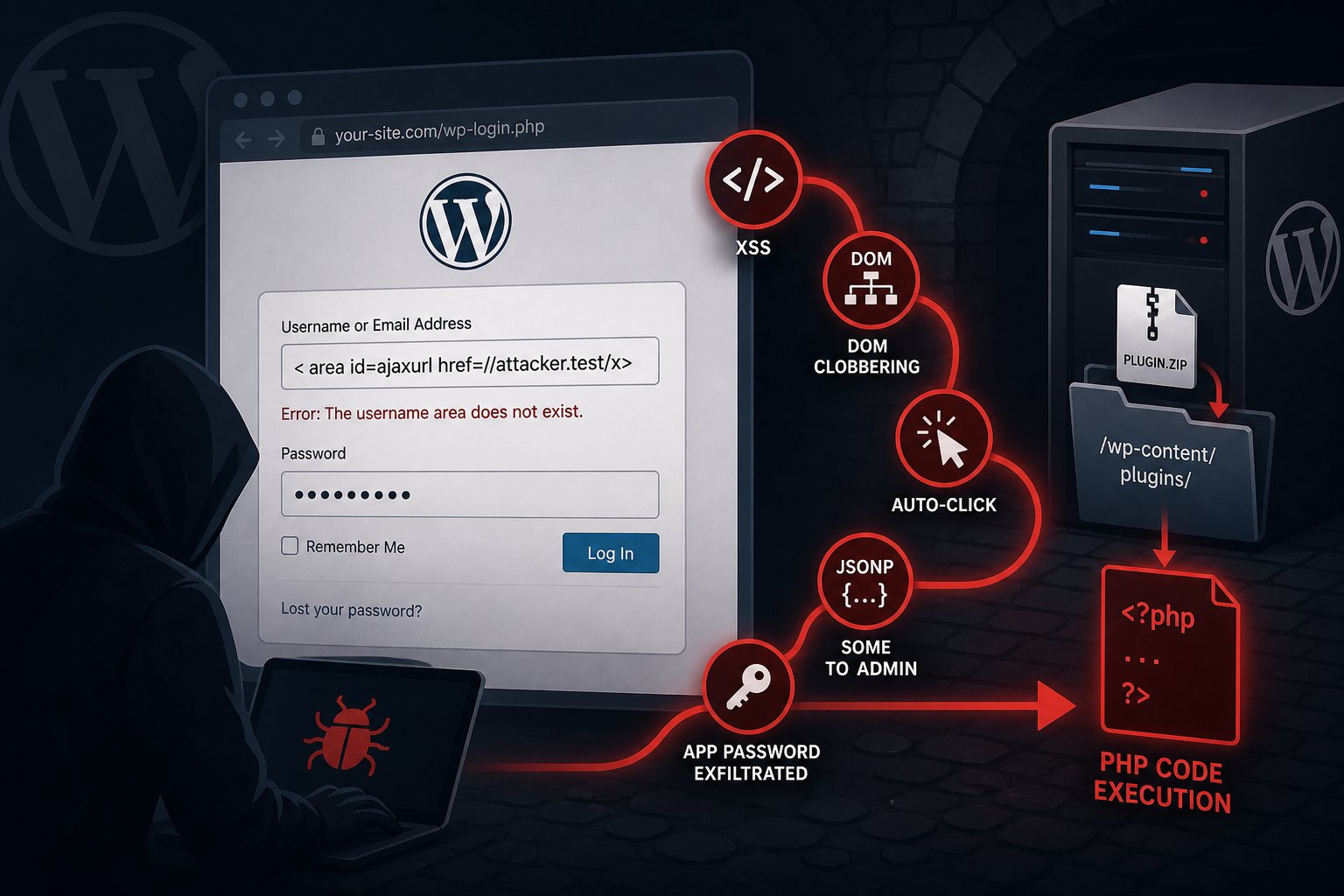
The root cause is a parser differential. WordPress's wp_strip_all_tags() — a wrapper around PHP's strip_tags() — silently ignores angle-bracket tags that have whitespace between < and the tag name. The input < area passes through as harmless text. WordPress's KSES sanitizer, which runs later in the output pipeline, takes the opposite view: it reads that same string as a valid <area> element and preserves its permitted attributes.
When an attacker submits a crafted username to /wp-login.php and that username doesn't exist, WordPress reflects it back into an error message built in wp-includes/user.php. That message passes through both sanitizers in sequence — and anything that slipped past the first arrives in the browser as live HTML markup.
The injected elements use DOM clobbering to override an undefined JavaScript variable (ajaxurl) and trigger an auto-click handler that already exists in WordPress's own user-profile.js. That click fires a REST API request with attacker-controlled JSONP callback parameters. The JSONP response uses Same-Origin Method Execution to remotely fire the “approve” button in an open administrator session — specifically the Application Password authorization screen. The new credential flows back to the attacker's server in the redirect URL. From there, the attacker authenticates to the REST API, uploads a plugin ZIP to wp-content/plugins/, and executes server-side PHP. The proof-of-concept code ran as the www-data user — from which a full database dump or lateral movement is a short step.
The Conditions That Limit (and Enable) Real Risk
The full RCE chain has two requirements worth being honest about. First, the target administrator needs to have an active WordPress session and follow an attacker-supplied link — social engineering is in the loop. Second, the Application Password feature (introduced in WordPress 5.6 and enabled by default on most installs) must be present; sites that have explicitly disabled it lose the RCE tail, though the XSS itself still executes.
Neither condition is unusual on a real small-business site. Administrators frequently stay logged in across browser sessions, and Application Passwords are enabled on a default install. A phishing email, a malicious ad redirect, or a compromised page the administrator happens to browse is sufficient to close the chain.
As of August 8, 2026, the WordPress security advisory confirms no in-the-wild exploitation. The pwn.ai team withheld the full proof-of-concept to allow patch adoption time. That window is measured in days, not weeks: when technical disclosure is this detailed and the target is this widely deployed, weaponized tooling follows quickly.
What Else Is in WordPress 7.0.3
XSS2Shell is the headline, but 7.0.3 carries eleven other fixes — any of which would justify an update on its own:
- Contributor+ stored XSS in emoji settings, the Post Content block, the Quick Edit interface, and the Post Date block (four separate issues)
- Privilege escalation on multisite installs that allowed unauthorized site creation (found by Aikido Security)
- Information disclosure via the Latest Comments block (exposed comments on password-protected posts) and via comment feeds
- Author+ CSS injection bypass
- Email confirmation bypass
- Server-side request forgery (SSRF) in URL validation
The security team backported all twelve fixes to every branch under active maintenance, back to version 4.7. If your site has auto-updates enabled for security releases — WordPress has shipped this on by default since version 3.7 — you are likely already running 7.0.3. Confirm under Dashboard → Updates.
What to Do Right Now
Updating to 7.0.3 closes the vulnerability. While you're in the dashboard, a few additional checks are worth the five minutes:
- Audit Application Passwords. Go to Users → Profile for every administrator account and review the Application Passwords section. Revoke anything you didn't create or don't recognize. If your site has no REST API integrations that depend on Application Passwords, disable the feature entirely using the
wp_is_application_passwords_availablefilter in your theme'sfunctions.phpor a site-specific plugin. - Check for unfamiliar administrators. A post-exploitation step is often a new admin account. Review Users → All Users filtered by Administrator role.
- Verify your WAF rule set is current. Payloads using the parser-differential pattern — a space between
<and the tag name — should be caught by any up-to-date WAF. If you're running ModSecurity with an older CRS, check that you're on Core Rule Set 4.x. - Enable security auto-updates if they aren't on. The eight-day turnaround from July 27 disclosure to August 6 patch is commendably fast. Sites with auto-updates needed zero manual action.
This is precisely the scenario where having WordPress core updates applied automatically — rather than queued for a weekly maintenance window — makes a difference. At Falcon Internet, our managed hosting environments apply WordPress security releases as soon as they ship, and our 24x7x365 NOC monitoring catches anomalous REST API and plugin activity before it becomes a breach. XSS2Shell is a useful reminder of why that posture exists.