CVE-2026-19949: Your Backup Plugin Is Now an Attack Vector for 3.2 Million Sites
If you run WordPress and use All-in-One WP Migration and Backup — ServMask's hugely popular site-migration plugin with over five million active installations — you need to open your WordPress dashboard right now and check the plugin version. CVE-2026-19949, a high-severity SQL injection vulnerability patched on August 20, is actively being exploited in the wild, and as of September 3 roughly 3.25 million sites have not applied the fix.
The flaw earned a CVSS 8.8 score, and the realistic outcome of a successful attack is not just a database dump — it is a full, persistent shell on your web server. No login required on the attacker's end.
How the Attack Chain Works
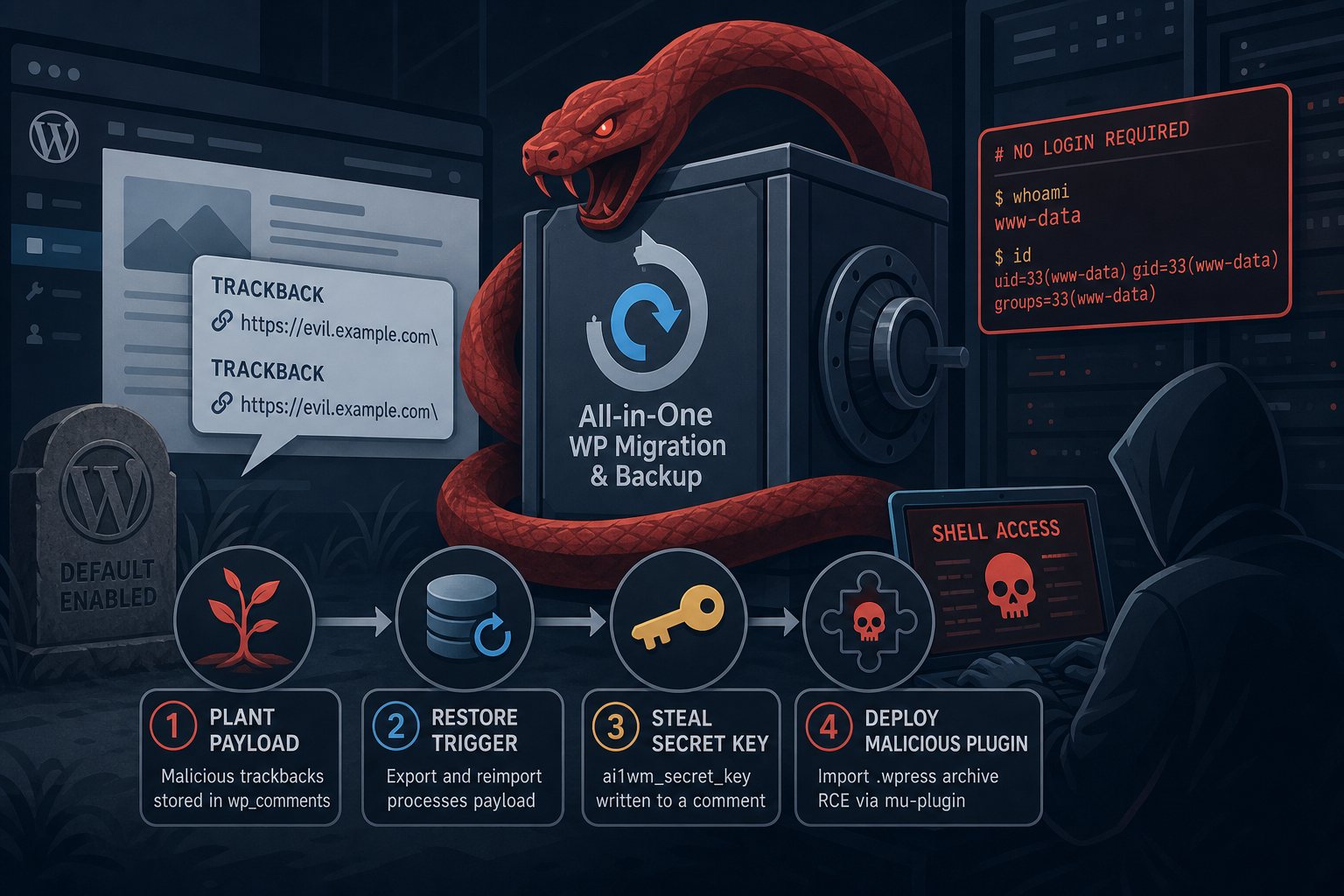
This is what security researchers call a second-order SQL injection, which makes it more interesting and more dangerous than a garden-variety form-field attack. The attacker never touches the plugin directly. Instead, the chain works like this:
- Step 1 — Plant the payload. The attacker submits two specially crafted trackbacks to any public post on your site. Each trackback contains a URL with a trailing backslash. WordPress stores these in its
wp_commentstable without sanitizing the backslash sequences. No credentials are needed; trackbacks are a core WordPress feature enabled by default. - Step 2 — Wait for a restore. The next time an administrator exports the site using All-in-One WP Migration and then reimports that archive — a routine operation for migrations, staging pushes, or backup tests — the plugin rewrites URLs and table prefixes across the database. When it processes the attacker's crafted trackback data, the unsanitized input is promoted to executable SQL.
- Step 3 — Steal the secret key. The malicious SQL writes the plugin's internal
ai1wm_secret_keyvalue into a comment that gets approved and becomes publicly readable via WordPress's REST API. The attacker polls that endpoint and retrieves the key. - Step 4 — Deploy a malicious plugin. Armed with the secret key, the attacker crafts a
.wpressarchive containing a malicious must-use plugin and imports it through the plugin's own restore endpoint. The next page load executes the attacker's code at the PHP level — full remote code execution.
The whole chain can be scripted. Public proof-of-concept exploit code appeared by September 3, 2026. There are no preconditions on the victim's site beyond the plugin being installed and trackbacks being enabled — which is the default WordPress configuration.
Why 65% of Sites Have Not Patched
Here is the part that should frustrate anyone who cares about security communication: ServMask shipped the fix on August 20 — five days after the researcher reported it, which is genuinely fast. But the version 7.110 changelog described the change as: "Find and replace on values ending in a backslash."
That description tells a site owner nothing. There is no mention of a security fix, no CVE number, no severity rating. A plugin manager or automated update system looking for a reason to prioritize this would see a cosmetic text tweak and move on. Security firm Wordfence published a full technical disclosure on September 2 — 13 days after the patch shipped — which is when the security community broadly understood what the update actually contained. By then, exploit code was already circulating.
This pattern has a name: security-by-obscurity in changelogs. It slows one in a hundred attackers. It reliably slows millions of defenders.
Who Is Affected
Any WordPress site running All-in-One WP Migration and Backup version 7.109 or earlier is vulnerable if:
- WordPress trackbacks are enabled (the default), and
- An administrator has performed — or is likely to perform — a site export and reimport using the plugin.
The second condition means the risk window can sit dormant for weeks. An attacker plants the trackback today; the vulnerability fires the next time you migrate a staging site or restore from a backup. You will not know the exploit ran until the malicious must-use plugin starts executing.
The premium extensions — Unlimited, Dropbox, Google Drive, and others — are separate packages but share the same core library. If you run any of them, verify that the base plugin is also on 7.110 or later.
What to Do Right Now
- Update immediately. Go to Plugins → Installed Plugins and update All-in-One WP Migration and Backup to version 7.110 or later. If you manage multiple sites, run this across all of them today.
- Check your must-use plugins directory. After updating, review
/wp-content/mu-plugins/for any files you do not recognize. Must-use plugins execute on every page load and are not listed in the normal Plugins screen. Anything unfamiliar should be treated as a sign of compromise. - Audit recent trackbacks and comments. Look at approved comments and trackbacks from the past 30 days for entries with unusual URLs or backslash-heavy content. These may be artifacts of a planted payload.
- Disable trackbacks if you do not use them. Under Settings → Discussion, uncheck "Allow link notifications from other blogs (pingbacks and trackbacks)." This removes the initial attack surface and has no practical downside if you were not actively using pingbacks.
- Check for the exposed secret key. If a restore happened on an unpatched version, query your
wp_commentstable for comment content matching the stringai1wm_secret_key. Its presence in an approved comment means the attack chain fired.
The Lesson That Keeps Not Being Learned
The gap between patch release (August 20) and widespread awareness (September 2) is exactly the window attackers used to build their tooling. It is the same story we see repeatedly: a fix ships with opaque notes, update rates stay low, exploit code catches up, and millions of sites spend two weeks in a vulnerable state they did not know about.
If you manage WordPress sites for clients — or your own business — a reliable update cadence is not optional. Neither is a monitoring process that does not depend on plugin authors writing clear changelogs. Services like Wordfence Intelligence or Patchstack surface CVE disclosures before exploit code goes public; that 13-day window is exactly what they exist to close.
We have seen this class of attack — where the backup or migration tool itself becomes the weapon — often enough that routine restores should include a post-restore integrity check of the mu-plugins directory. At Falcon Internet, file-system state verification after any restore is standard practice for that exact reason.