Claude Code approval file left 1,379 secrets in public GitHub repos
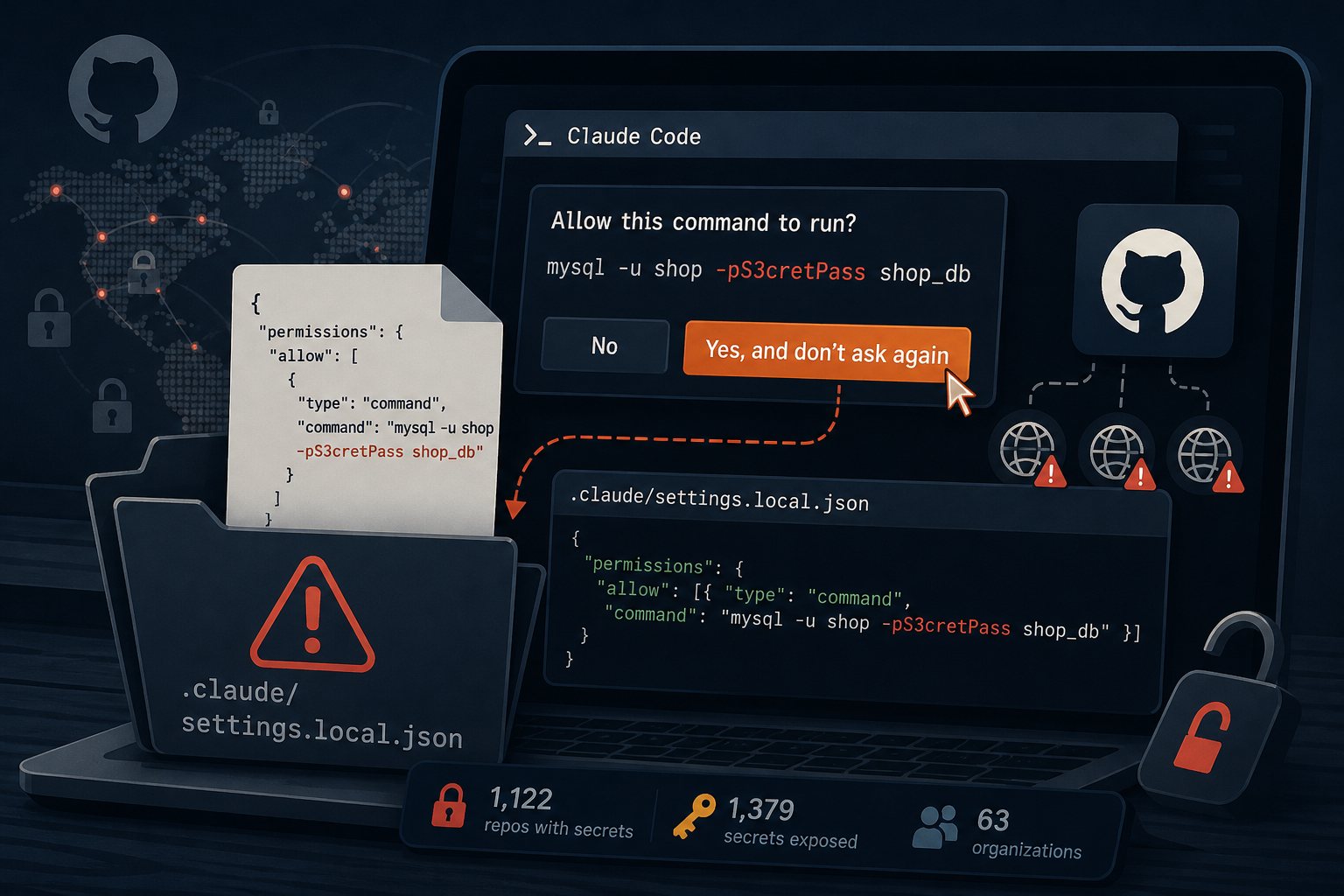
When a user approves a shell command in Claude Code with Yes, and don't ask again, Anthropic's coding agent saves that approval as an allow rule in .claude/settings.local.json inside the project. If the approved command was an exact command with a password or token typed into it, the secret is saved in that file in plain text. Apiiro researchers Shmulik Cohen and Matan Giladi searched public GitHub between November 1 and 3 and found 1,122 copies of the file holding at least one credential, 1,379 distinct secrets in total. They published the results this week.
The most common secrets were database passwords and logins for internet-facing servers. If a developer, contractor, or agency builds or maintains your site with Claude Code, their repositories and laptops may hold your database and hosting passwords.
How an approved command reaches a public repository
A pattern rule such as Bash(npm run test *) contains no secret. An exact-command rule stores the whole string, so approving mysql -u shop -pS3cretPass shop_db or sshpass -p 'hunter2' ssh deploy@203.0.113.10 writes the password into the file.
Anthropic's settings documentation says that the first time Claude Code writes this file in a git repository, it adds **/.claude/settings.local.json to the user's global git excludes file. That entry exists on one machine only. Claude Code does not add the file to the project's own .gitignore, and the exclude has no effect on a file that is already tracked, a file created by hand, or a git add -f. Packaging and deployment tools that ignore git rules skip it too: Lakera reported in April that it found credentials in 33 of these files published inside npm packages. The same documentation says the VS Code extension lets a user save an approval to the shared .claude/settings.json, a file teams are told to commit.
Apiiro traced history in 1,105 repositories with a secret in the file. In 539 of them, a commit that listed Claude as co-author changed it.
Apiiro's counts from 104,185 public copies
- 104,185 copies of
settings.local.jsonin 103,617 public repositories; 1,122 (1.1%) contained at least one secret. - Secret types included 379 database passwords, 43 SSH credentials for public servers, 42 GitHub, GitLab, and npm tokens, and 23 AWS keys.
- Every affected file was still on its default branch on November 2. Half had been there at least 217 days.
- 211 forks of 74 repositories carried the same secrets, and older versions of the file held 734 more secrets in 509 repositories.
- Counting git history, shared
settings.jsonfiles, and saved agent transcripts, the total was 2,539 secrets across 1,994 repositories belonging to 63 organizations.
Apiiro did not test whether the credentials still work. It notified owners on November 2 and 3, and one company confirmed its key was live. Apiiro sells security products for coding agents, the 2,539 figure relied on an LLM reviewer rather than manual checks, and no third party has reproduced the counts. Of 16 coding agents Apiiro compared by reading their documentation, Claude Code was the only one confirmed to save the full approved command to a project file by default.
Gitleaks and TruffleHog missed 215 of the 1,122 files
Gitleaks flagged 564 of the files and TruffleHog flagged 643, both run without their verification step. Neither caught 215. Most of the misses were passwords inside commands, after PGPASSWORD=, sshpass -p, or mysql -p. Those strings have no provider prefix such as AKIA or ghp_ for a scanner to match, so a clean scan does not clear this file.
Bug report #5544 was closed by a bot as not planned
GitHub issue #5544 on the anthropics/claude-code tracker, filed August 11, 2025, describes this behavior with API keys and Jira tokens. The github-actions bot closed it as "not planned" on January 3, 2026, after 60 days without activity. Apiiro says the related reports it cited were closed the same way without a reply from Anthropic and that Anthropic did not respond to the research. The current Claude Code documentation describes the same default behavior as of November 8.
Rotate first, then clean the repository
Forks and existing clones keep old copies after you rewrite history, so change every exposed password, token, and key before doing anything else. To find the files, search your GitHub organization with org:your-org path:.claude/settings.local.json, then check each repository's history and each developer's machine:
git log --all --oneline -- .claude/settings.local.json .claude/settings.json
find ~ -path '*/.claude/settings.local.json' 2>/dev/null
jq -r '.permissions.allow[]?' .claude/settings.local.json
Read every allow rule the last command prints. After rotating, stop tracking the file and confirm git ignores it:
git rm --cached .claude/settings.local.json
echo '.claude/settings.local.json' >> .gitignore
git commit -m "Stop tracking Claude Code local settings"
git check-ignore -v .claude/settings.local.json
To purge the file from history, run git filter-repo --invert-paths --path .claude/settings.local.json and force-push, after warning collaborators. Then delete any secret-bearing rules from the local file on each machine, including files that were never committed. On the servers we manage at Falcon Internet, we treat any credential found in a public repository as compromised and rotate it before looking into how it leaked.
Keeping passwords out of approved commands
Give the agent commands that reference a credential file instead of containing the password. For MySQL or MariaDB, put the user and password in a client option file with mode 600 and approve mysql --defaults-extra-file=~/.my-shop.cnf shop_db. PostgreSQL reads ~/.pgpass (also mode 600). Use SSH keys loaded in ssh-agent instead of sshpass. Approve patterns rather than single commands, and add .claude/, .cursor/, and similar agent folders to pre-commit and CI secret scanning with custom rules for PGPASSWORD=, sshpass -p, and -p followed by text.
If a project folder is deployed by rsync, SFTP, or a zip upload, the .claude directory can land in the web root. To block the directory, use location ~ /\.claude/ { deny all; } in nginx or RedirectMatch 404 /\.claude/ in Apache, then confirm that curl -I https://example.com/.claude/settings.local.json returns 403 or 404.