ConnectWise Cloud Backup credential abused in 173 Microsoft 365 tenants
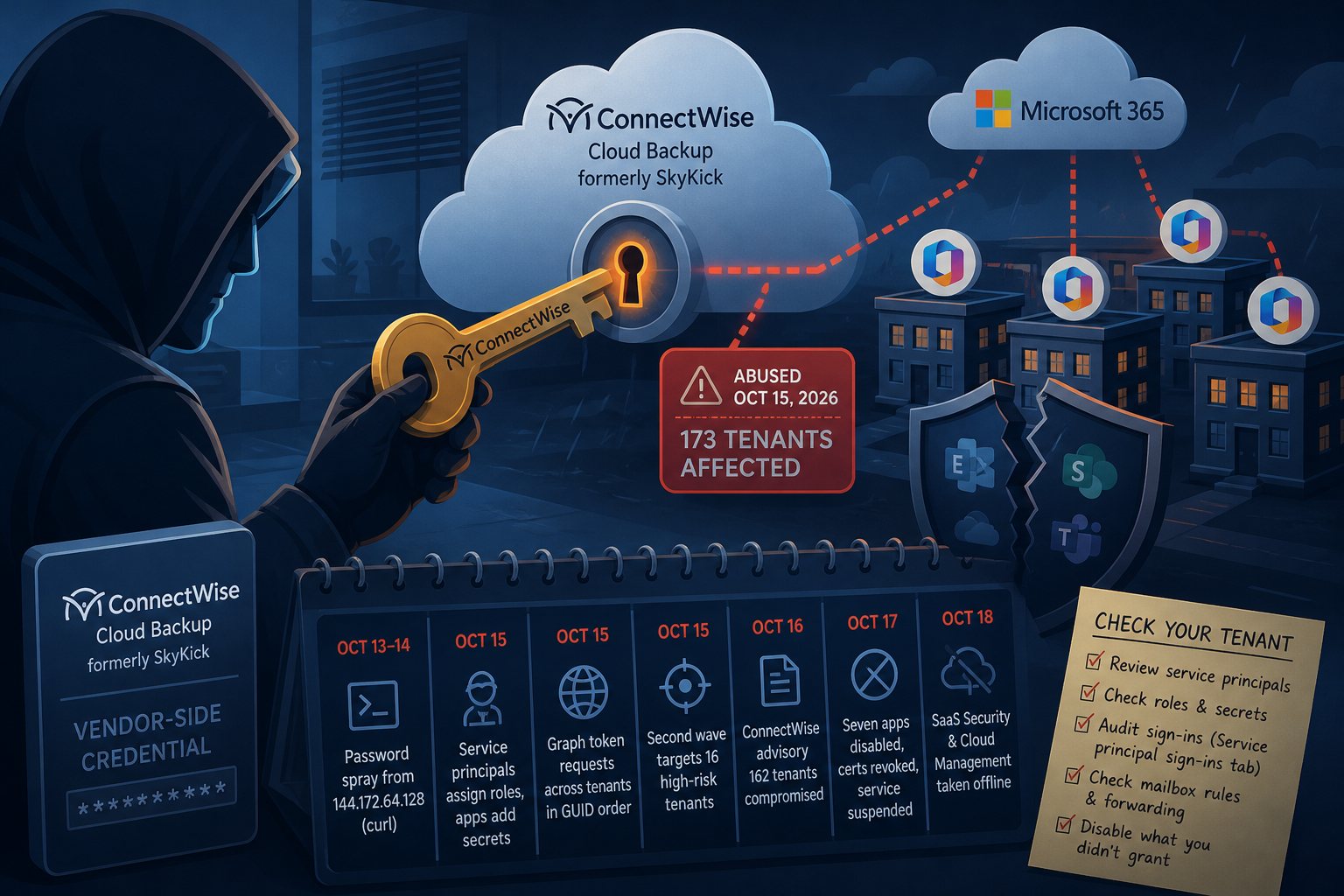
Someone holding the vendor-side credential for ConnectWise Cloud Backup, the Microsoft 365 backup service formerly sold as SkyKick, used it on October 15, 2026 to sign in to customer tenants as the backup application. Huntress has confirmed unauthorized sign-ins in 173 tenants. ConnectWise suspended the service on October 17, and no Cloud Backup customer has had a scheduled Microsoft 365 backup since then.
The product is sold mainly through managed service providers, so plenty of small businesses have it consented in their tenant without knowing the name. Dormant connections are exposed too. One administrator reported a Privileged Identity Management alert for a SkyKick app that had not been used in years assigning itself the Exchange Administrator role.
Timeline from password spray to shutdown
- October 13-14: the address 144.172.64.128 password-sprays four law firm tenants using a curl user agent. Huntress saw no successful user logins from it.
- October 14: ConnectWise says it identified the issue.
- October 15, from 01:58 UTC: ConnectWise Cloud Management service principals assign themselves directory roles, mostly Exchange Administrator, in about 50 tenants Huntress monitors. In one tenant the Teams management app took Global Administrator, then added client secrets to two other applications, one of them Huntress's own security app. Those secrets were set to expire in 2028.
- October 15, 06:13 to 08:34 UTC: the Cloud Backup app requests Microsoft Graph tokens from 144.172.64.128, moving through tenants a few seconds apart in sorted GUID order.
- October 15, 09:25 to 14:20 UTC: a second wave targets 16 tenants in policy, national security, trade and critical-mineral sectors. Huntress says those attempts failed.
- October 16: ConnectWise publishes an advisory. Huntress counts 162 compromised tenants by 19:00 UTC.
- October 17, 07:00 UTC: ConnectWise disables seven application identities, revokes the certificates behind them and suspends Cloud Backup. Microsoft Threat Intelligence calls it an active supply chain attack.
- October 18: ConnectWise takes its SaaS Security and Cloud Management services offline as a precaution while it reviews other partner-facing services.
Huntress has since reported sign-in activity from the attacker's address in almost 1,000 Entra tenants, roughly 300 of them successful. Tenants that had already removed the service principal could not be reached. ConnectWise has not said how the credential was exposed or whether a product vulnerability contributed.
App-only sign-ins bypass MFA and session revocation
The attacker authenticated as the application with the application's own credential. No user signed in, so MFA prompts and user-targeted Conditional Access policies never applied. The access inherited whatever an administrator consented to when the backup was set up: read and write on mail and attachments, OneDrive and SharePoint files, and Teams chats. Microsoft assessed that the attacker likely abused permissions including Directory.ReadWrite.All, then ran Graph reconnaissance and tried to add credentials to service principals.
Revoking user sessions does nothing to app-only access. Disabling a service principal blocks new tokens, but tokens already issued stay valid until they expire. Secrets planted on other apps in your tenant keep working after ConnectWise rotates its own credentials, and Huntress points out that some Graph directory reads leave no audit record at all.
Backups paused with no restore date
Scheduled backups are not running, and archive access and restores are unavailable. ConnectWise says the archives are encrypted, isolated and show no evidence of access, and that it has no restoration time to share. Mail, files and chats created or changed during the suspension have no recovery point in Cloud Backup. Until service returns, Microsoft's native retention (Recoverable Items, the OneDrive and SharePoint recycle bins) is the only fallback unless you put a second backup product in place now.
Checking a tenant with Microsoft Graph PowerShell
Run these checks in your own tenant, and if you manage clients, in every client tenant. In the Entra admin center, open Enterprise applications and search for SkyKick and ConnectWise; older tenants show the apps as "SkyKick Cloud Manager". The script below reports each of the seven app IDs ConnectWise disabled, whether the service principal is enabled, and any directory roles it holds.
Connect-MgGraph -Scopes "Application.ReadWrite.All","RoleManagement.Read.Directory"

$ids = @(
  "506e08f9-6e9a-4da4-942b-a099a03644ae",  # Cloud Backup
  "2399d300-6fca-4e6a-a686-399fefe75b83",  # Cloud Management
  "24205314-2b89-4e07-a2a4-579e898a5640",  # Cloud Management - MS Teams
  "b78f6a77-d4e5-46fb-87e5-d1648bd02519",  # Cloud Management - Exchange Online
  "0de14c77-b9b0-4137-9360-34878a929827",  # Cloud Management - MS Graph
  "412dcf96-176d-4b3a-a1b0-4981ad66971e",  # Cloud Management - Partner Center
  "b2b55f5b-7758-4719-8d8f-88ae172e6bdb"   # Cloud Management - SharePoint Online
)

foreach ($id in $ids) {
  $sp = Get-MgServicePrincipal -Filter "appId eq '$id'"
  if (-not $sp) { continue }
  "{0}  enabled={1}" -f $sp.DisplayName, $sp.AccountEnabled
  Get-MgRoleManagementDirectoryRoleAssignment -Filter "principalId eq '$($sp.Id)'" |
    ForEach-Object { "  role: " + (Get-MgRoleManagementDirectoryRoleDefinition -UnifiedRoleDefinitionId $_.RoleDefinitionId).DisplayName }
}
Disable anything still enabled, and remove any role you did not grant on purpose. Disable rather than delete: deleting the service principal removes the consent and forces a re-consent when ConnectWise restores service.
Update-MgServicePrincipal -ServicePrincipalId $sp.Id -AccountEnabled:$falseNext, list secrets and certificates created since October 13 on every app registration and service principal in the tenant. The attacker added secrets to unrelated management and security apps, so do not limit this to ConnectWise.
$since = Get-Date "2026-10-13"
$objs = @(Get-MgApplication -All) + @(Get-MgServicePrincipal -All)
foreach ($o in $objs) {
  @($o.PasswordCredentials) + @($o.KeyCredentials) |
    Where-Object { $_.StartDateTime -ge $since } |
    ForEach-Object { "{0}  {1}  expires {2}" -f $o.DisplayName, $_.DisplayName, $_.EndDateTime }
}
Whoever creates a secret can set its start date, so confirm against the Entra audit log. Filter on the activities Add member to role, Update application and Add service principal credentials, and look for a service principal acting on itself or on another app.
For sign-ins, open Monitoring, then Sign-in logs, then the Service principal sign-ins tab. The default tab shows only users and will not list this activity. Filter on application ID 506e08f9-6e9a-4da4-942b-a099a03644ae and look for 144.172.64.128 or the user agents Python-urllib/3.12 and python-requests/2.31. ConnectWise asks partners to review from October 13 onward. Export the logs before you change anything.
Mailbox forwarding and rule checks
ConnectWise also tells partners to look for mailbox forwarding, inbox and transport rules, and delegated access. From Exchange Online PowerShell:
Connect-ExchangeOnline

Get-Mailbox -ResultSize Unlimited |
  Where-Object { $_.ForwardingSmtpAddress -or $_.ForwardingAddress } |
  Select-Object UserPrincipalName, ForwardingSmtpAddress, ForwardingAddress

Get-TransportRule | Select-Object Name, State, WhenChanged

Get-Mailbox -ResultSize Unlimited |
  ForEach-Object { Get-InboxRule -Mailbox $_.UserPrincipalName } |
  Where-Object { $_.ForwardTo -or $_.RedirectTo -or $_.DeleteMessage } |
  Select-Object MailboxOwnerId, Name, ForwardTo, RedirectTo
ConnectWise takes reports of suspicious activity at SecurityPartnerSupport@ConnectWise.com.
Entra controls that limit third-party app credentials
When Falcon Internet takes over a client's Microsoft 365 tenant, we remove app consents left behind by previous providers. A backup or management app that stayed in the tenant after the MSP relationship ended still holds every permission it was granted. The other controls Huntress recommends:
- Application management policies that block new client secrets or cap their lifetime. A cap would have prevented the 2028 expiry dates seen in this attack.
- A short list of people holding Application Administrator and Cloud Application Administrator.
- Conditional Access for workload identities, which restricts where a service principal can sign in from. It requires a Microsoft Entra Workload ID license.
- Microsoft Entra ID Protection, which flags risky service principals.