TLS certificates drop to 64 and 100 days in 2027: renewal audit steps
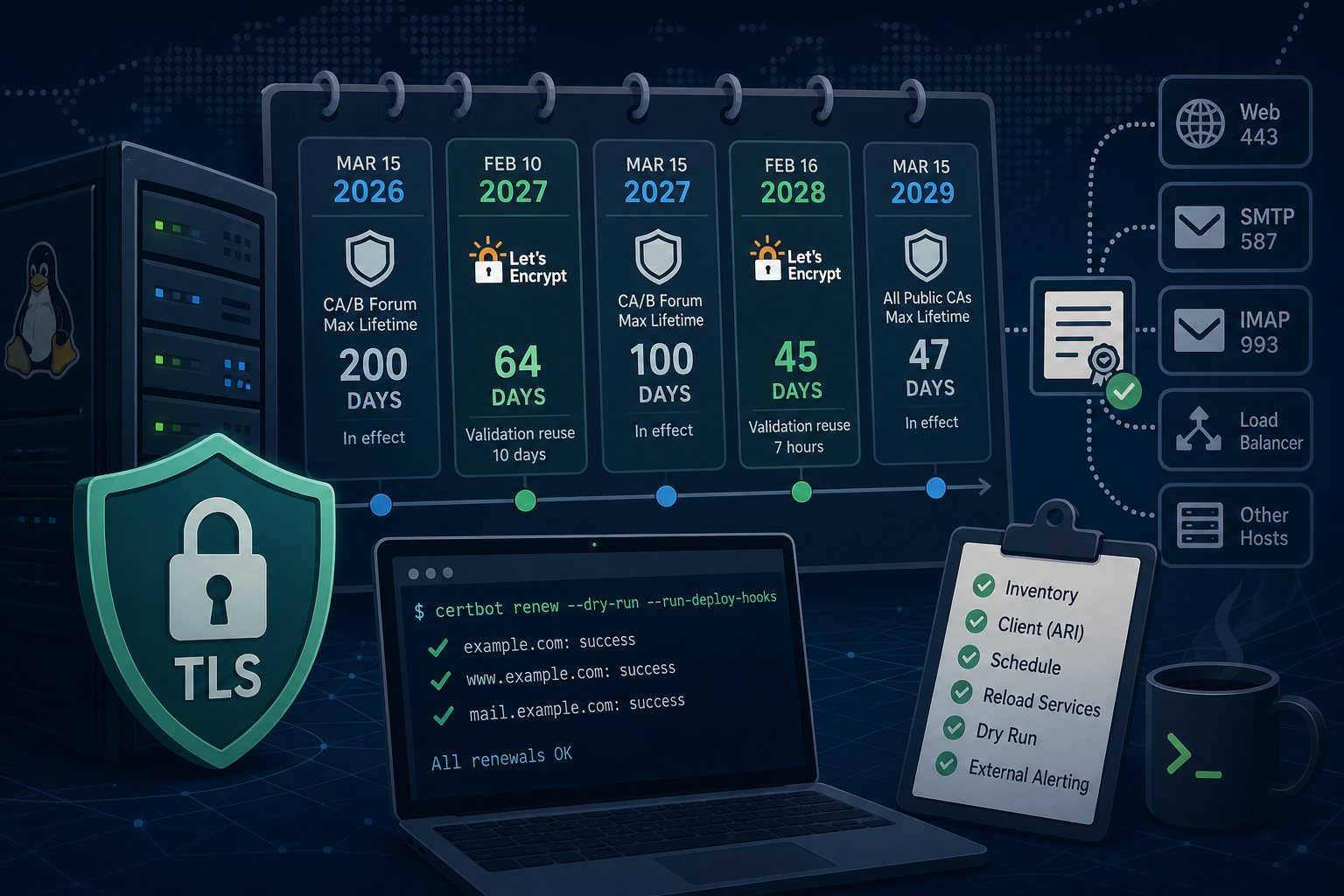
Two separate schedules are shortening TLS certificate lifetimes. The CA/Browser Forum's Ballot SC-081v3, passed in April 2025, cut the maximum lifetime of a publicly trusted certificate from 398 days to 200 days on March 15, 2026. It drops to 100 days on March 15, 2027, and to 47 days on March 15, 2029. Let's Encrypt is moving faster: its default classic profile switches from 90-day to 64-day certificates on February 10, 2027, and to 45-day certificates on February 16, 2028.
A certificate that renews on a timer and reloads the web server will keep working through all of this. The failures we see come from the parts nobody checks: an old client, a hand-written cron line, a mail server that never reloads, a copy of the certificate on a second box. This guide walks through an audit of one Linux server running Certbot, with notes for acme.sh.
Dates and limits that apply to your certificates
- March 15, 2026 (in effect): commercial certificates max out at 200 days. A one-year purchase now means at least two installs per year.
- February 10, 2027: Let's Encrypt default certificates become 64-day certificates, and validation results are reused for only 10 days instead of 30.
- March 15, 2027: commercial certificates max out at 100 days, so four installs per year.
- February 16, 2028: Let's Encrypt default certificates become 45-day certificates, with a 7-hour validation reuse window.
- March 15, 2029: 47-day maximum for every public CA.
Each limit applies to certificates issued on or after the date. A certificate issued the day before keeps its full term. Let's Encrypt also stopped sending expiration warning emails on June 4, 2025, so if a renewal fails today, nothing outside your own monitoring will tell you.
Step 1: list every certificate and where it is served
Start on the server with Certbot's own inventory:
sudo certbot certificatesThat shows what Certbot manages. It does not show certificates bought from a commercial CA, certificates copied to a load balancer, or the one your mail server uses. Check what clients see from the outside, from any machine with OpenSSL:
for target in example.com:443 www.example.com:443 mail.example.com:993; do
  host=${target%:*}
  echo "== $target"
  echo | openssl s_client -connect "$target" -servername "$host" 2>/dev/null \
    | openssl x509 -noout -issuer -enddate
done
For SMTP submission on port 587, add -starttls smtp to the s_client line. Any certificate whose issuer is not Let's Encrypt, and any host whose expiry date differs from what certbot certificates reports, goes on a list. Those are the certificates installed by hand or copied somewhere, and they are the ones that will expire first under a 100-day limit.
Step 2: check the client version for ARI support
ACME Renewal Information (ARI, RFC 9773) lets the CA tell your client when to renew. Let's Encrypt uses it to schedule renewals at roughly two-thirds of a certificate's lifetime and to push early renewals when it has to revoke certificates in bulk. Its December 2025 announcement of the 45-day schedule recommends ARI for every client.
certbot --versionCertbot added ARI in 4.1.0, released June 10, 2025. Certbot 4.0.0 changed the default renewal point from a fixed 30 days before expiry to one-third of the lifetime remaining. The distribution packages are behind both:
- Ubuntu 24.04: 2.9.0
- Debian 12: 2.1.0
- Ubuntu 26.04 and Debian 13: 4.0.0
These older versions still renew a 64-day or 45-day certificate on time, because 30 days before expiry falls inside both lifetimes. They ignore ARI, so they will not respond to a revocation notice until their own schedule comes around. The Certbot project's supported install method is the snap, whose current release is 5.8.0 from September 1, 2026:
sudo apt remove certbot
sudo snap install --classic certbot
sudo ln -s /snap/bin/certbot /usr/bin/certbot
certbot --version
Removing the apt package leaves /etc/letsencrypt in place, so existing certificates and renewal settings carry over. If you use a DNS plugin from apt, such as python3-certbot-dns-cloudflare, install the snap version before the next renewal:
sudo snap set certbot trust-plugin-with-root=ok
sudo snap install certbot-dns-cloudflare
For acme.sh, ARI arrived in 3.1.4 on July 17, 2026 and is on by default. Run acme.sh --upgrade and confirm the version with acme.sh --version.
Step 3: confirm the renewal schedule and remove fixed-day overrides
systemctl list-timers | grep -i certbot
grep -rn certbot /etc/crontab /etc/cron.* /var/spool/cron 2>/dev/null
You want exactly one scheduler. The snap installs snap.certbot.renew.timer, which runs twice a day. The apt package uses certbot.timer. After switching to the snap, delete any leftover cron entry that calls certbot renew so two copies don't run against each other. Delete any cron line that renews on a calendar interval, such as the first of every other month. A 60-day interval misses a 45-day certificate entirely, and Let's Encrypt's announcement says so directly.
Then look for renewal thresholds pinned in the per-certificate config:
grep -H renew_before_expiry /etc/letsencrypt/renewal/*.confA renew_before_expiry = 30 days line was often added years ago to match the old default. On Certbot 4.0 or later it overrides the lifetime-based calculation. Delete the line unless you have a specific reason for it, and Certbot will renew with a third of the lifetime left, or earlier if ARI says to.
Step 4: reload every service that uses the certificate
The Nginx and Apache plugins reload the web server after renewal. Postfix, Dovecot, HAProxy and anything else reading the same files from /etc/letsencrypt/live/ keep serving the old certificate from memory until reloaded. Certbot runs every executable file in /etc/letsencrypt/renewal-hooks/deploy/ after each successful renewal:
sudo tee /etc/letsencrypt/renewal-hooks/deploy/50-reload-services >/dev/null <<'EOF'
#!/bin/sh
systemctl reload nginx
systemctl reload postfix
systemctl reload dovecot
EOF
sudo chmod 755 /etc/letsencrypt/renewal-hooks/deploy/50-reload-services
Adjust the service names to what runs on the box. If the certificate is copied to another machine (a load balancer, a separate mail host, a NAS or firewall), the copy and the reload on the far end belong in this hook too. Copying by hand was manageable once a year. With 64-day certificates it means six copies a year per host.
Step 5: run a renewal against the staging server
sudo certbot renew --dry-run --run-deploy-hooks--dry-run performs a full validation against Let's Encrypt's staging server without touching your live certificates. It runs pre and post hooks by default. --run-deploy-hooks also runs the deploy hooks if the dry run succeeds, which tests the reload script from Step 4. Every certificate should report success. After February 10, 2027, every renewal will need a fresh validation, so fix any dry-run failure now.
Step 6: alert on expiry from a second machine
Renewal logs on the server only help if someone reads them. Run an external check daily from a different host. This script flags any certificate with less than a quarter of its lifetime left. Certbot normally renews at one-third, so an alert means renewals have been failing for several days:
#!/bin/bash
# /usr/local/bin/check-certs: print a line for each certificate that needs attention
for target in example.com:443 www.example.com:443 mail.example.com:993; do
  host=${target%:*}
  pem=$(echo | timeout 10 openssl s_client -connect "$target" -servername "$host" 2>/dev/null | openssl x509 2>/dev/null)
  if [ -z "$pem" ]; then
    echo "$target: no certificate returned"
    continue
  fi
  start=$(date -d "$(echo "$pem" | openssl x509 -noout -startdate | cut -d= -f2)" +%s)
  end=$(date -d "$(echo "$pem" | openssl x509 -noout -enddate | cut -d= -f2)" +%s)
  now=$(date +%s)
  if [ $(( (end - now) * 4 )) -lt $(( end - start )) ]; then
    echo "$target: expires $(date -d "@$end" +%F), renewal has not happened"
  fi
done
The script uses GNU date, so run it on Linux. Schedule it with cron and set MAILTO at the top of the crontab; cron mails the output only when there is output, so a quiet day sends nothing:
MAILTO=ops@example.com
15 7 * * * /usr/local/bin/check-certs
Because the check is based on the fraction of lifetime remaining, it needs no changes when certificates go from 90 days to 64 or 45.
Validation failures that show up only at renewal time
- Port 80 closed or geo-blocked: HTTP-01 validation needs port 80 open. Let's Encrypt validates from several network locations, some outside the United States, so country-based firewall rules can block it.
- Expired DNS API tokens: DNS-01 renewals fail when the API key in the plugin's credentials file is rotated or revoked. Note where each token lives and when it expires.
- CAA records: if the domain has CAA records, the CA you use must be listed. Check with
dig CAA example.comafter any DNS provider change. - Commercial certificates: Sectigo and DigiCert both offer ACME endpoints. Certbot can use them with
--server,--eab-kidand--eab-hmac-key, which turns a quarterly manual install into the same automated renewal as above.
On the servers we manage, the external expiry check runs separately from the renewal job and alerts our 24x7x365 NOC, so a failed renewal gets worked on before the certificate expires.