Rank Math PRO 3.0.123 downloads carried a backdoor for 11 hours
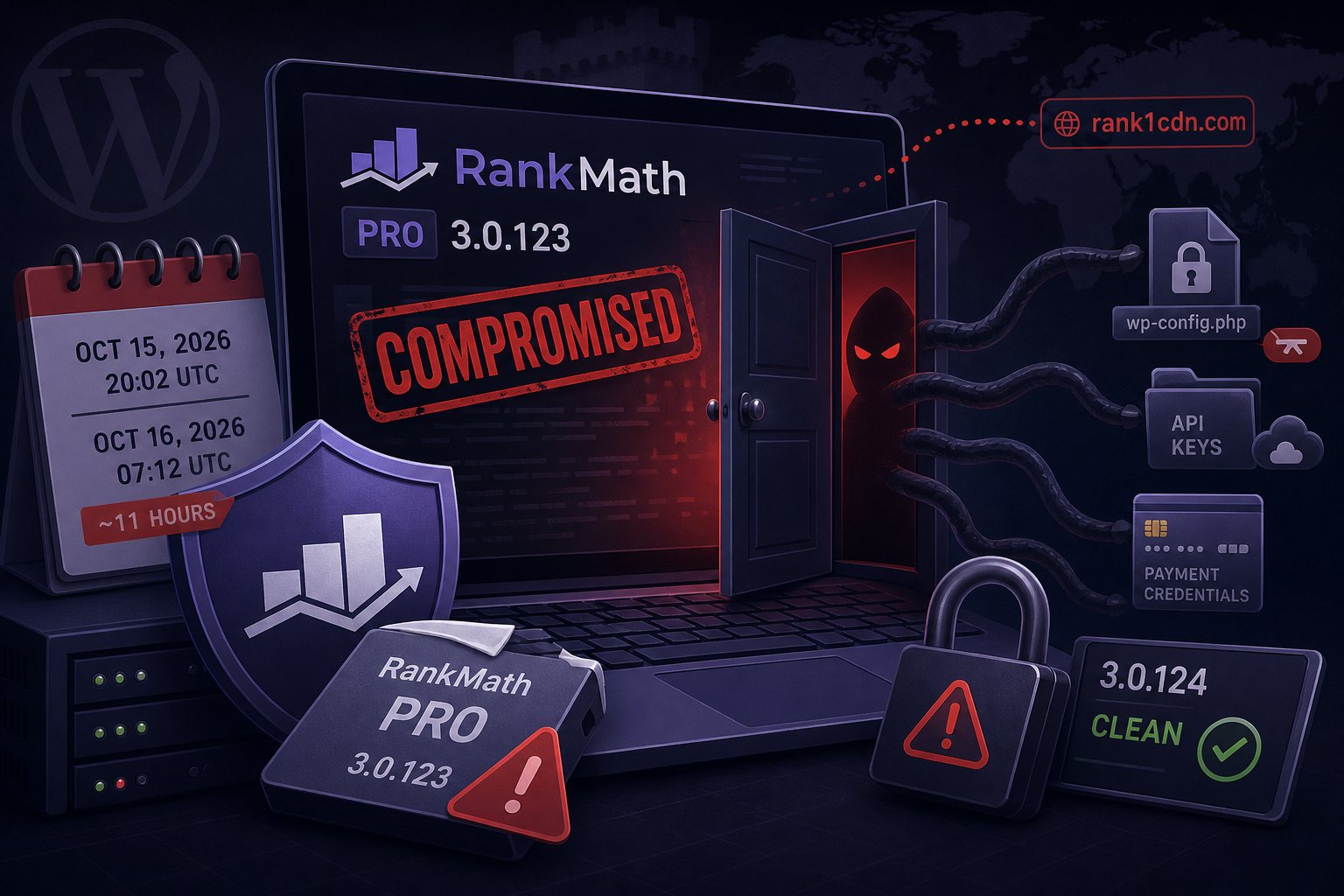
Rank Math has confirmed that some copies of its paid Rank Math PRO 3.0.123 plugin contained malware. The tainted packages came from Rank Math's own download and update channel between October 15, 2026 at 20:02 UTC and October 16 at 07:12 UTC, a window of about 11 hours. The vendor removed the files and released a clean 3.0.124. Patchstack tracks the incident as CVE-2026-111862 with a CVSS score of 9.8.
The free Rank Math SEO plugin on WordPress.org, which runs on more than 4 million sites, is not affected. Rank Math says a "limited number" of PRO customers received bad files. It has not given a count or said how the attackers got code into its release.
Which sites need cleanup
Running 3.0.123 does not by itself prove compromise, because only copies pulled during the window were modified. Rank Math's advisory sorts sites into three groups:
- Installed or updated to 3.0.123 during the window and activated it: treat the site as compromised and do a full recovery.
- Installed it but never activated it: delete the plugin folder, install 3.0.124 from your Rank Math account, and run a malware scan.
- Downloaded the zip but never installed it: no sign of compromise from that alone.
In US Eastern time the window ran from 4:02 p.m. on October 15 to 3:12 a.m. on October 16. A site with plugin auto-updates turned on could have taken the update overnight with nobody watching, Check update logs and file timestamps.
Malware behavior on an activated site
Per Rank Math, the payload sets up persistent access and talks to a lookalike domain, rank1cdn[.]com. It recreates its hidden backdoor whenever someone visits the site, so deleting a single file does not stick. Deactivating the plugin or updating to 3.0.124 replaces Rank Math's own files and leaves everything else the malware planted.
Rank Math published these indicators:
- Three rows in
wp_optionswith theoption_namevalues_uf6qdn2hmm,t8krdk990phband_np5pvf754c - A fake core file at
wp-includes/class-wp-cache-util.php .htaccessrules that make.cachefiles execute as PHP, and.cachefiles containing PHP- Administrator accounts with usernames starting
wpsupport_or email addresses ending@wp-mail[.]net - System crontab entries tagged
#ms6v46 - PHP using
base64_decodewith XOR loops and the keyxmmqhn, along withproc_openand PHP-FPM socket code, hidden inwp-content/mu-plugins/, other plugins, non-default themes, uploads, and Rank Math's ownincludes/folder
The advisory also tells owners to check SSH authorized_keys files, other system users' crontabs and running processes. The malware can reach as far outside the WordPress directory as the web server user's permissions allow. Anything that user could read, including wp-config.php, API keys and payment gateway credentials, should be treated as stolen.
BleepingComputer found a PHP sample on VirusTotal with matching indicators that steals AWS, Cloudflare, Google Cloud and Azure credentials and SSH keys, but could not confirm it came from the Rank Math package.
Shell checks with WP-CLI and find
Run these from the WordPress root as the site's own user. A hit on any of them means the site needs the full recovery below.
# Installed Rank Math plugins and versions
wp plugin list --fields=name,status,version | grep -i rank

# The three malicious options
for o in _uf6qdn2hmm t8krdk990phb _np5pvf754c; do
  wp option get "$o" >/dev/null 2>&1 && echo "FOUND option $o"
done

# Administrators, with registration dates
wp user list --role=administrator --fields=ID,user_login,user_email,user_registered

# Fake core file and any other core changes
ls -la wp-includes/class-wp-cache-util.php
wp core verify-checksums

# .htaccess rules mentioning .cache, and .cache files holding PHP
find . -name .htaccess -exec grep -l '\.cache' {} +
find . -name '*.cache' -exec grep -l '<?php' {} +

# PHP in uploads, and anything in mu-plugins
find wp-content/uploads -name '*.php'
ls -la wp-content/mu-plugins/
With root, search every user's crontab for the marker. The spool is /var/spool/cron/crontabs/ on Debian and Ubuntu and /var/spool/cron/ on RHEL-family systems, so one recursive search covers both:
grep -r 'ms6v46' /var/spool/cron/ /etc/cron* 2>/dev/nullwp core verify-checksums will report class-wp-cache-util.php as a file that should not exist. Premium plugins have no public checksums on WordPress.org, so wp plugin verify-checksums --all cannot vouch for Rank Math PRO or other paid plugins. Compare those against fresh copies from the vendor.
Recovery order
Rank Math recommends restoring both files and the database from a backup taken before October 15 at 20:02 UTC. A files-only restore leaves the malicious options in the database.
Without a usable backup, sequence matters, because the backdoor rebuilds itself on page loads:
- Delete the entire
rank-math-profolder, delete the three option rows, and block outbound connections to rank1cdn.com. Rank Math says not to move on until all three are done. On a server with no egress firewall, an/etc/hostsentry pointing rank1cdn.com at0.0.0.0stops lookups by name. - Remove malicious PHP from the locations listed above, delete rogue administrators, and clean the
.htaccessrules. - Replace core with
wp core download --force --skip-content --version=$(wp core version)after deleting the fake file, then rerunwp core verify-checksums. - Review
wp cron event listand the system crontabs, and remove anything you did not create. - Reinstall every plugin and theme from official sources.
- Check SSH keys, other users' crontabs, running processes and writable directories outside the web root.
- Watch outbound connections and file changes for several days. A deleted file that comes back means a rebuild component survived.
Credentials to rotate after cleanup
Rank Math says rotation is required even after a clean restore, because the secrets may already have left the server:
- WordPress passwords, starting with administrators, and a review of admin two-factor settings
- The database password in
wp-config.php - The authentication keys and salts in
wp-config.php(wp config shuffle-saltsregenerates them and logs out every session) - Payment gateway, SMTP and third-party API keys
- Hosting control panel, FTP/SFTP and SSH credentials, plus secrets stored in environment variables
Shared-hosting customers cannot see other accounts' crontabs, SSH keys or system processes, and Rank Math's advisory tells them to ask their host to check. On servers Falcon Internet manages, our staff run those root-level checks because customers do not have root.
Download 3.0.124 by logging in at rankmath.com directly. Rank Math says it never emails login or download links, so treat any message offering a patched copy as phishing.