Offsite Linux server backups with restic 0.20.0 and S3 storage
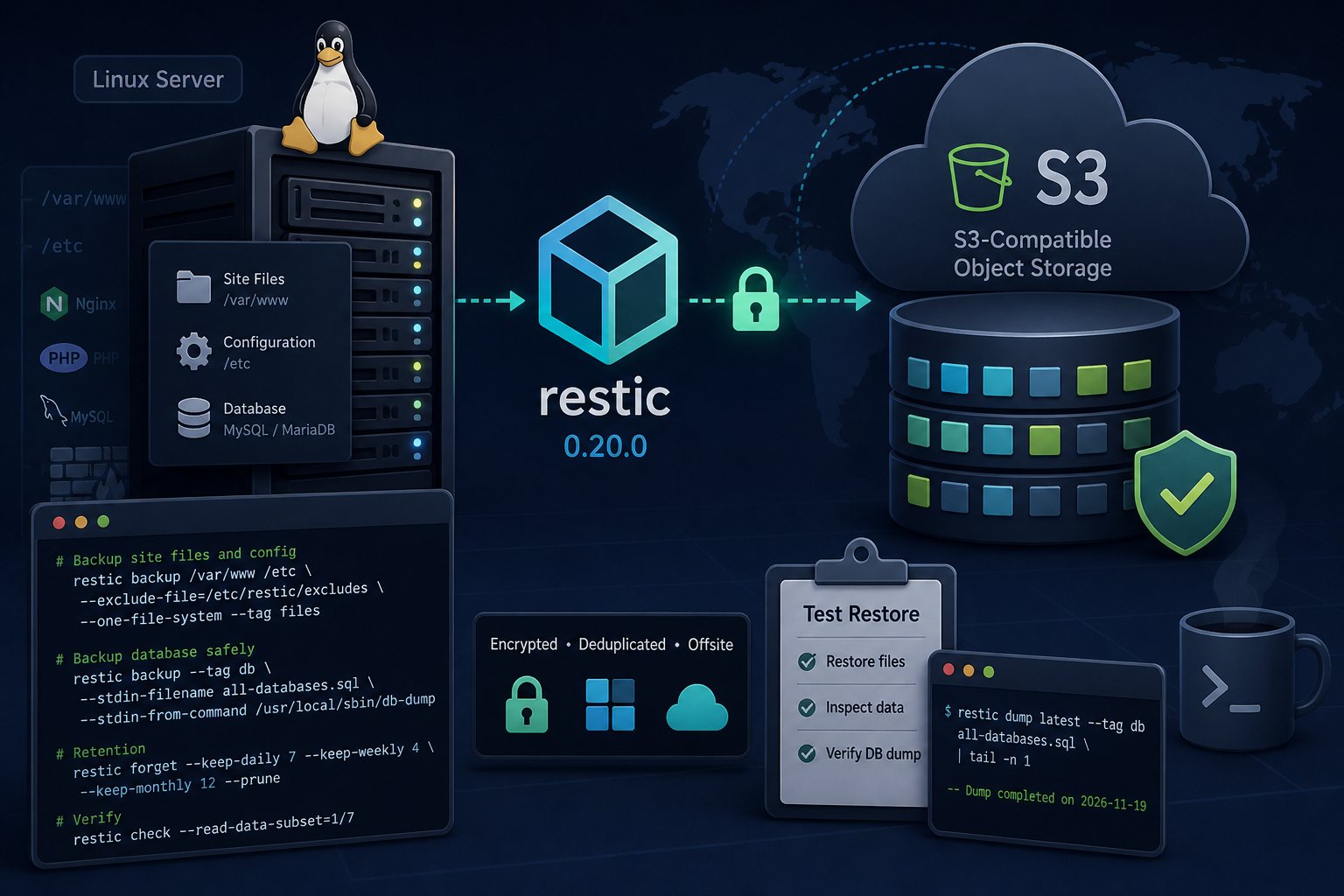
A backup that lives on the same server as the website protects you from a bad plugin update and very little else. Disk failure, a compromised root account, or ransomware that encrypts every mounted volume will take the backup with it. This guide sets up encrypted, deduplicated offsite backups of a Linux web server with restic, sends them to S3-compatible object storage, and shows how to prove a restore works before you need one.
The commands were written for Ubuntu 24.04 and AlmaLinux 9 and assume a typical LAMP or LEMP host: site files under /var/www, configuration under /etc, and a MySQL or MariaDB database. Run them as root.
Install restic 0.20.0 from the upstream binary
The restic project released 0.20.0 on November 19, 2026. Its changelog lists two security fixes in restore: one where a crafted snapshot containing a symlink and a directory with the same name could write files outside the restore target, and one where --ownership-by-name could hand restored files to UID 0 when a user name did not exist on the restore host.
Ubuntu 24.04's archive carries restic 0.16.4, which lacks --stdin-from-command, which arrived in 0.17.0 and is the safest way to back up a database dump (covered below). Install the upstream binary instead and check its hash:
cd /tmp
curl -LO https://github.com/restic/restic/releases/download/v0.20.0/restic_0.20.0_linux_amd64.bz2
curl -LO https://github.com/restic/restic/releases/download/v0.20.0/SHA256SUMS
sha256sum --ignore-missing -c SHA256SUMS
bunzip2 restic_0.20.0_linux_amd64.bz2
install -m 0755 restic_0.20.0_linux_amd64 /usr/local/bin/restic
restic version
Use the linux_arm64 file on ARM servers. If an older packaged copy is installed, remove it so /usr/bin/restic does not shadow the new one in cron or systemd jobs.
Create the bucket, credentials and password file
Create a bucket with your object storage provider and an access key scoped to that bucket only. Do not reuse an account-wide key. Then store the credentials where only root can read them:
mkdir -p /etc/restic
chmod 700 /etc/restic
openssl rand -base64 32 > /etc/restic/password
chmod 600 /etc/restic/password

cat > /etc/restic/env <<'EOF'
RESTIC_REPOSITORY=s3:https://s3.example-provider.com/acme-web01-backup
RESTIC_PASSWORD_FILE=/etc/restic/password
AWS_ACCESS_KEY_ID=REPLACE_ME
AWS_SECRET_ACCESS_KEY=REPLACE_ME
AWS_DEFAULT_REGION=us-east-1
EOF
chmod 600 /etc/restic/env
For non-Amazon providers the repository format is s3:https://host:port/bucket. If no region is set, restic uses us-east-1; set AWS_DEFAULT_REGION to whatever your provider documents.
Copy the password file to your password manager now. The restic documentation states that losing the password means the data is irrecoverably lost. Nobody at the storage provider can decrypt it for you.
Initialize the encrypted repository
set -a; . /etc/restic/env; set +a
restic init
The set -a line exports every variable in the file into your shell, so later commands in the same session do not need -r or a password prompt. A successful run prints the repository ID. An access-denied error at this stage almost always means the key is not scoped to the bucket you named, or the provider wants a different endpoint hostname.
Back up site files and configuration with an exclude list
Cache directories and old local backup archives add size without adding value. Put them in an exclude file:
cat > /etc/restic/excludes <<'EOF'
/var/www/*/wp-content/cache
/var/www/*/wp-content/upgrade
/var/www/*/wp-content/ai1wm-backups
/var/www/*/wp-content/updraft
/var/www/*/storage/framework/cache
**/node_modules
*.tmp
EOF

restic backup /var/www /etc \
  --exclude-file=/etc/restic/excludes \
  --one-file-system \
  --tag files
Adjust the paths to match your stack. Include /etc because rebuilding web server, PHP-FPM and firewall configuration from memory takes longer than restoring it. Exclude patterns do not apply to paths you pass explicitly on the command line, so list parent directories as arguments and exclude below them.
The first run uploads everything. Later runs send only new or changed chunks.
Dump MySQL or MariaDB straight into restic
Copying /var/lib/mysql while the server is running produces an inconsistent copy. Use a logical dump instead. The common pattern of piping mysqldump into restic backup --stdin has a flaw that the restic documentation calls out: restic cannot tell whether the dump finished, so a failed dump can be saved as a truncated snapshot that looks fine. --stdin-from-command runs the dump itself and refuses to create a snapshot if the command exits non-zero.
Put the dump command in its own script so its exit status is easy to test and its options stay separate from restic's:
cat > /usr/local/sbin/db-dump <<'EOF'
#!/bin/bash
exec mysqldump --all-databases --single-transaction \
  --routines --triggers --events
EOF
chmod 700 /usr/local/sbin/db-dump

restic backup --tag db \
  --stdin-filename all-databases.sql \
  --stdin-from-command /usr/local/sbin/db-dump
On MariaDB the same tool is installed as mariadb-dump. If you pass dump options directly on the restic command line instead of using a script, put a double hyphen before the dump command so restic does not read those options as its own. Root normally authenticates over the local socket; if your server requires a password, put it in /root/.my.cnf with mode 600 rather than on the command line, where it shows up in the process list. --single-transaction gives a consistent dump of InnoDB tables without locking the site. MyISAM tables do not get that guarantee.
Retention with forget and prune
Restic never deletes snapshots on its own. A policy that keeps a week of dailies, a month of weeklies and a year of monthlies looks like this:
restic forget --keep-daily 7 --keep-weekly 4 --keep-monthly 12 --dry-run
restic forget --keep-daily 7 --keep-weekly 4 --keep-monthly 12 --prune
Run the --dry-run version first and read the list of snapshots marked for removal. By default snapshots are grouped by host and path, so the files and db snapshots get separate retention counts. Pruning locks the repository and backups cannot run while it holds the lock, so schedule it away from the nightly backup window.
Schedule the job with a systemd timer
Create /usr/local/sbin/restic-nightly:
#!/bin/bash
set -euo pipefail
set -a; . /etc/restic/env; set +a

restic backup /var/www /etc \
  --exclude-file=/etc/restic/excludes --one-file-system --tag files
restic backup --tag db --stdin-filename all-databases.sql \
  --stdin-from-command /usr/local/sbin/db-dump
restic forget --keep-daily 7 --keep-weekly 4 --keep-monthly 12 --prune
restic check
Then the unit and timer:
chmod 700 /usr/local/sbin/restic-nightly

cat > /etc/systemd/system/restic-nightly.service <<'EOF'
[Unit]
Description=restic offsite backup
After=network-online.target mysql.service mariadb.service
Wants=network-online.target

[Service]
Type=oneshot
ExecStart=/usr/local/sbin/restic-nightly
Nice=10
IOSchedulingClass=idle
EOF

cat > /etc/systemd/system/restic-nightly.timer <<'EOF'
[Unit]
Description=Run restic backup nightly

[Timer]
OnCalendar=*-*-* 02:30:00
RandomizedDelaySec=30m
Persistent=true

[Install]
WantedBy=timers.target
EOF

systemctl daemon-reload
systemctl enable --now restic-nightly.timer
systemctl start restic-nightly.service
journalctl -u restic-nightly.service -n 50
Persistent=true runs a missed job at the next boot. Hook the service's failure state into whatever monitoring you already use. Restic exits with code 3 when some source files could not be read, which means the snapshot exists but is incomplete; treat that as a failure, not a warning.
Verify the stored data with restic check
Plain restic check verifies the repository's structure and index. It does not download and test the data itself. To read back actual contents without pulling the whole repository every time, check a rotating slice:
restic check --read-data-subset=1/7Run it weekly with the numerator incrementing from 1 to 7 and you will have read every pack file over seven weeks. A random sample such as --read-data-subset=5% also works. Some providers charge for egress, so check pricing before running --read-data against a large repository.
Run a test restore to a scratch directory
A restore you have never run is an assumption. Do this once after setup and then on a fixed schedule:
restic snapshots
restic restore latest --tag files --target /root/restore-test \
  --include /var/www/example.com
ls -la /root/restore-test/var/www/example.com

restic dump latest --tag db all-databases.sql | head -n 20
restic dump latest --tag db all-databases.sql | tail -n 1 | grep 'Dump completed'
A complete mysqldump or mariadb-dump file ends with a comment line containing Dump completed on and a timestamp. If the grep prints nothing, the dump was cut off. For a full test, load the dump into a disposable database server or a staging VM, point a copy of the site at it, and load a few pages. Delete /root/restore-test when finished so stale copies of customer data do not pile up on the server.
Common mistakes
- The server can delete its own backups. The key in
/etc/restic/envneeds delete rights forforget --pruneto work, which means an attacker with root on the web server can wipe the bucket. Turn on bucket versioning or object lock if your provider supports it, or runforget --prunefrom a separate management host with its own key and give the web server a key that cannot delete. The restic project's rest-server also has an append-only mode for this purpose. - The password exists only on the server. If the server is gone, so is the only copy of the key that decrypts the backups.
- Old binaries in the path. A cron job or timer calling a distro-packaged restic will silently skip features the script depends on. Run
which -a resticto confirm. - Nobody reads the logs. Jobs often fail for weeks after an access key is rotated or a bucket hits its quota. Alert on failure.
- Uploads outside the backup set. Applications that store files in
/srv,/homeor a mounted volume need those paths added.--one-file-systemskips other mounts unless you list them explicitly.
At Falcon Internet we run scheduled test restores for managed servers, separate from the nightly backup jobs.