Preparing Linux servers for 64-day Let's Encrypt certificates in 2027
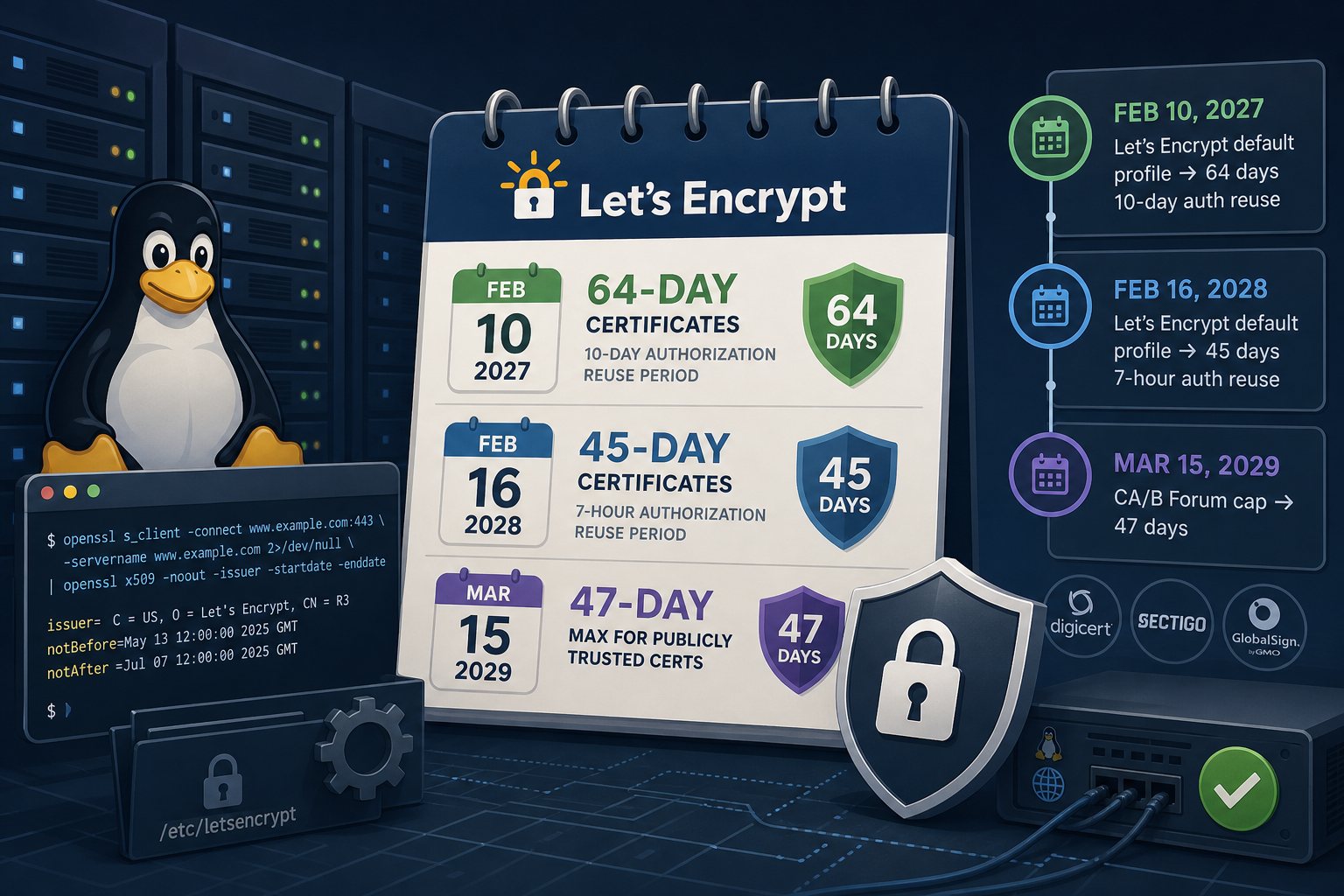
Let's Encrypt has issued 90-day certificates since it launched in 2015. That changes on February 10, 2027, when its default classic profile drops to 64-day certificates with a 10-day authorization reuse period. On February 16, 2028, the same profile drops again to 45 days, and authorization reuse falls to 7 hours. The opt-in tlsserver profile has issued 45-day certificates since May 13, 2026, so you can test against the shorter lifetime today.
Commercial certificates are on a similar track. CA/Browser Forum ballot SC-081v3, passed in April 2025, capped publicly trusted TLS certificates at 200 days for anything issued from March 15, 2026. The cap falls to 100 days on March 15, 2027, and to 47 days on March 15, 2029. A "one-year" certificate bought from a commercial CA today has to be reissued and reinstalled at least once during its term.
Most servers running a current ACME client will handle 64-day certificates without changes. The failures we expect come from old clients, fixed-interval cron jobs, certificates copied by hand to other services, and services that never reload after a renewal.
Inventory every certificate your servers present
Start with what clients see. A renewed certificate does nothing if the running service still holds the old one in memory. Check each public hostname and each TLS port in use:
# HTTPS
echo | openssl s_client -connect www.example.com:443 -servername www.example.com 2>/dev/null \
  | openssl x509 -noout -issuer -startdate -enddate

# SMTP submission with STARTTLS
echo | openssl s_client -connect mail.example.com:587 -starttls smtp 2>/dev/null \
  | openssl x509 -noout -issuer -enddate

# IMAPS
echo | openssl s_client -connect mail.example.com:993 2>/dev/null \
  | openssl x509 -noout -issuer -enddate
Repeat for 465, 995, control panel ports such as 2083 or 8443, FTP over TLS, and any admin interface on a nonstandard port. Write down which certificate each service uses and how it gets there. Anything that lands on a service through a manual copy-and-paste is a candidate for failure once renewals happen every few weeks instead of every few months.
On Certbot hosts, list what Certbot manages:
sudo certbot certificatesCompare that list against the hostnames you checked above. A hostname served over TLS that is missing from the Certbot list is getting its certificate from somewhere else, and you need to know where.
Certbot 4.1 or later for ARI and lifetime-based renewal
Two Certbot releases matter here. Certbot 4.0.0 (April 7, 2025) changed the default renewal point from a fixed 30 days before expiry to one third of the certificate's lifetime remaining. Certbot 4.1.0 (June 10, 2025) added ACME Renewal Information (ARI, RFC 9773), which lets the CA tell the client when to renew. Let's Encrypt can use ARI to ask clients to renew early ahead of a mass revocation, and it recommends ARI as the primary way to time renewals under shorter lifetimes. With ARI, certbot renew checks the server's suggested window automatically, and for Let's Encrypt certificates it typically renews about two thirds of the way through the lifetime.
Check what you have:
certbot --versionUbuntu 24.04 ships Certbot 2.9.0 in its archive. That version will still renew a 64-day certificate because it renews at 30 days remaining, but it ignores ARI and will not respond if Let's Encrypt asks for early renewal during an incident. The Certbot project's supported install method is the snap:
sudo apt remove certbot python3-certbot-nginx python3-certbot-apache
sudo snap install --classic certbot
sudo ln -sf /snap/bin/certbot /usr/bin/certbot
certbot --version
Your existing configuration in /etc/letsencrypt stays in place. After the switch, confirm only one renewal scheduler is active. The apt package installs certbot.timer and the snap installs snap.certbot.renew.timer:
systemctl list-timers | grep -i certbot
grep -ri certbot /etc/cron* /var/spool/cron 2>/dev/null
Remove leftover cron entries from older installs, especially ones that run certbot renew --force-renewal on a fixed schedule. Forced renewals ignore ARI and burn through Let's Encrypt's limit of 5 certificates per exact set of hostnames every 7 days.
Hardcoded renewal thresholds in renewal configs
Each Certbot certificate has a file in /etc/letsencrypt/renewal/. Look for a pinned threshold:
sudo grep -H renew_before_expiry /etc/letsencrypt/renewal/*.confA line such as renew_before_expiry = 30 days overrides the lifetime-based default when the CA gives no ARI response. That value still works with 64-day and 45-day certificates, but a value of 60 or 90 days would force a renewal on every run once lifetimes drop. Delete the line unless you have a specific reason to keep it.
acme.sh settings to check
acme.sh added ARI in release 3.1.4, enabled by default, and profile selection with --cert-profile in 3.1.2. Upgrade and look at the stored renewal interval for each domain:
acme.sh --upgrade
acme.sh --version
grep -H Le_RenewalDays ~/.acme.sh/*/*.conf
If a domain was issued with a custom --days value that is close to or above 45, lower it or remove it so ARI decides the window. The acme.sh documentation is inconsistent about whether an explicit --days value overrides ARI, so test on one domain before changing all of them.
Deploy hooks for services outside the web server
The Certbot nginx and Apache plugins reload the web server after renewal. Postfix, Dovecot, HAProxy, and anything else reading the same files will keep serving the old certificate until restarted. Add a deploy hook, which Certbot runs only after a successful renewal:
sudo tee /etc/letsencrypt/renewal-hooks/deploy/reload-services.sh >/dev/null <<'HOOK'
#!/bin/sh
# RENEWED_LINEAGE is set by Certbot, e.g. /etc/letsencrypt/live/mail.example.com
case "$RENEWED_LINEAGE" in
  */mail.example.com)
    systemctl reload postfix
    systemctl reload dovecot
    ;;
esac
HOOK
sudo chmod 755 /etc/letsencrypt/renewal-hooks/deploy/reload-services.sh
If a certificate has to reach another machine, such as a load balancer, a NAS, or a firewall's SSL inspection profile, script the copy in the same hook with scp or the device's API. If the device has no way to accept a certificate automatically, put it behind a reverse proxy that does, or plan to replace it. A manual reinstall every six weeks will be missed.
Test the 45-day profile on Let's Encrypt staging
The staging environment receives each lifetime change about a month before production, and it already serves the tlsserver profile. Issue a throwaway certificate for a test hostname that points at the server:
sudo certbot certonly --staging --webroot -w /var/www/html \
  -d test.example.com --preferred-profile tlsserver

sudo openssl x509 -in /etc/letsencrypt/live/test.example.com/cert.pem \
  -noout -startdate -enddate

sudo certbot renew --cert-name test.example.com --dry-run
sudo certbot delete --cert-name test.example.com
The start and end dates should be 45 days apart. --preferred-profile falls back to the CA's default profile if the named profile disappears, which makes it the safer choice for production. --required-profile fails the renewal instead. Both flags arrived in Certbot 4.0.0, and 4.1.0 started saving them to the renewal config.
Expiry alerts sized for short lifetimes
A 30-day expiry warning made sense for 90-day certificates. With 64-day certificates renewing around day 43, a certificate with 30 days left is normal and the alert becomes noise. Alert at 14 days remaining, which still leaves a week of retries after a missed renewal. A minimal cron check:
#!/bin/sh
# Print a warning for any listed host whose certificate expires within 14 days
for host in www.example.com shop.example.com mail.example.com; do
  echo | openssl s_client -connect "$host:443" -servername "$host" 2>/dev/null \
    | openssl x509 -noout -checkend 1209600 >/dev/null \
    || echo "WARNING: $host certificate expires within 14 days"
done
Run it from a machine other than the one being checked, so a dead server does not silence its own alert. Falcon Internet runs its certificate expiry checks from outside the hosting network for that reason.
Other failure points we see during renewals
- DNS-01 API credentials. Wildcard certificates renew through a DNS provider API token. Tokens that expire or get rotated during a staff change break renewal silently. Check the expiry date on each token.
- CAA records. A CAA record that lists only a commercial CA blocks Let's Encrypt issuance. Run
dig CAA example.combefore moving a domain to ACME. - Port 80 redirects and firewalls. HTTP-01 validation needs port 80 reachable from the internet. Geo-blocking rules and WAF challenges on
/.well-known/acme-challenge/cause failures that look random. - Commercial certificates. If you buy certificates, ask your CA whether it supports ACME. DigiCert, Sectigo, and GlobalSign all offer it, and it is the only practical way to keep up with 100-day certificates after March 15, 2027.